 Tetrate Global Load BalancerVersion: Latest
DNS Architecture
DNS Hierarchy
The Tetrate GSLB Solution manages a collection of DNS zones, described as 'Global' and 'Regional'. When clients attempt to resolve a DNS name to obtain the IP address of the gateway, they follow a small series of CNAME lookups in the 'Global' and 'Regional' zones to obtain the IP:
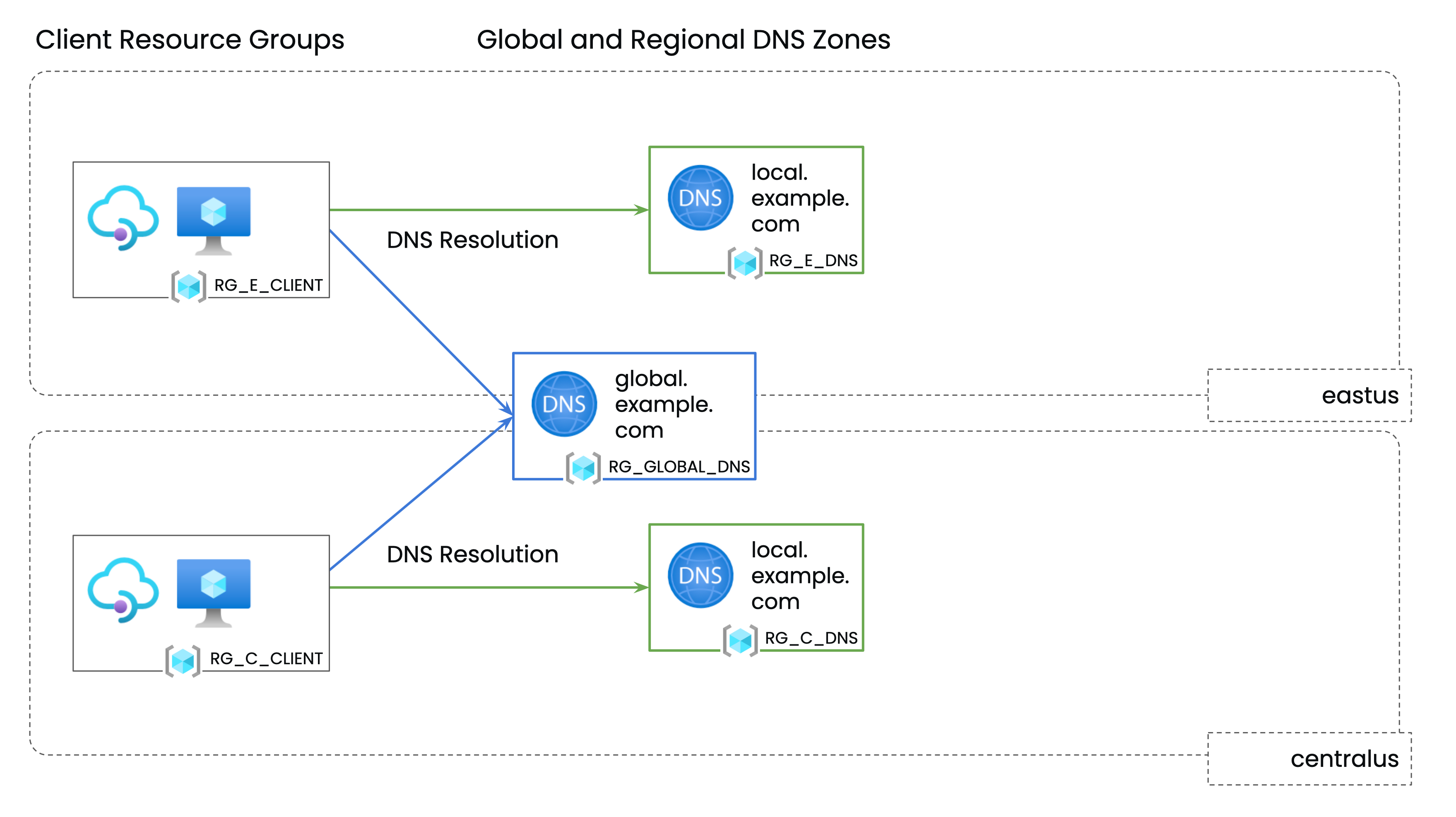
Each set of gateways has a shared Global Gateway Name which resolves through the CNAMEs to the IP addresses of working gateways in that set:
- If there are working gateways in the local region, only these IP addresses will be returned
- If there are no working gateways in the local region, the IP addresses of all working gateways will be returned
The DNS names that the solution manages are constructed from three settings:
- globalDNSZone - this documentation uses
global.example.comas the global DNS base FQDN - localDNSZone - this documentation uses
local.example.comas the local DNS base FQDN - gslb.tetrate.io/name - this documentation uses
edge-internalfor the name of the Gateway Set.
Generally, you would configure your public DNS names (the friendly/vanity names for your services) to alias to the CNAME of the Global Gateway Name, and you need to ensure that the services are then reachable through all of the Gateways in the gateway set, using the public DNS name.
DNS Resolution Process
| DNS entry | Notes |
API/App/Service namesOne name per published API/App/Service, in any suitable DNS zone. | Example: Each API/App/Service name is an alias for the Global Gateway CNAME. These entries are managed by the user/customer. |
Global Gateway nameLocated in the global GSLB Private DNS zone. | Example: The Global Gateway name is an alias for the Regional Gateway name. This entry is managed by the Tetrate GSLB solution. |
Regional Gateway nameLocated in each regional GSLB Private DNS zone. | Example: The Regional Gateway name resolves to the A records of the healthy Edge Gateways in that region. This entry is managed by the Tetrate GSLB solution. |
Failover Gateway nameLocated in the global GSLB Private DNS zone. | Example: The Failover Gateway name lists the A records of all healthy Edge Gateways. This entry is managed by the Tetrate GSLB solution. |
The terms "Global" and "Regional" refer to how the Private DNS Zones are used by the Tetrate solution. They do not refer to different types of DNS zones implementations.
On Azure and AWS, all zones are made visible through VNet or VPC mapping, or a similar means. A "Global" zone is made visible to all VNets or VPCs, whereas a "Regional" zone is made visible only to VNets or VPCs in the region. A region typically corresponds with a cloud-provider's region, but you may wish to configure several cloud-provider regions to use the same GSLB "Regional" DNS zone.
Multiple Gateway Sets can be configured and operate independently of each other, sharing the same global and local DNS zones.
Managing the DNS entries
During operation, the Tetrate Solution dynamically manages the Global Gateway, Regional Gateway and Failover Gateway names to ensure that clients who resolve an API/App/Service name are given the most appropriate A records in response.
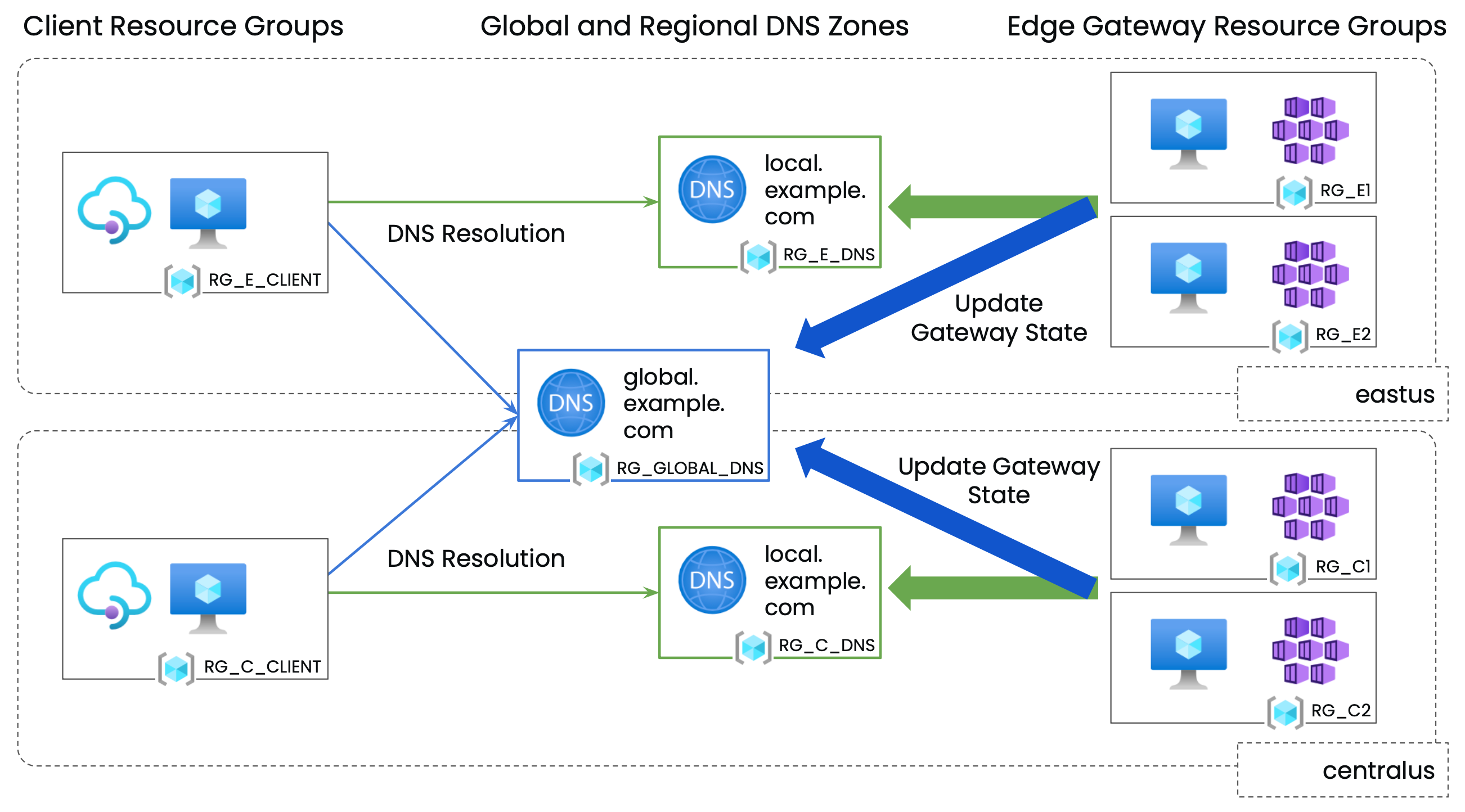
For example:
| During Normal Operation | |
| ... are aliases for the Global Gateway CNAME: ... which is an alias for the CNAME: ... which resolves to: the A records for all gateways in the local region |
| In the event of a Gateway failure | |
| ... are aliases for the Global Gateway CNAME: ... which is an alias for the CNAME: ... which resolves to: the A records for healthy gateways in the local region. Failed gateways are removed from the response |
| In the event of a regional failure | |
| ... are aliases for the Global Gateway CNAME: ... which is an alias for the CNAME: ... which resolves to: the A records for all remaining healthy gateways in all regions |
There may be several Edge Gateway RGs in each region (for redundancy). Client Resource Groups are indicated for convenience; the required configuration is to link the clients' VNETs (Azure) or VPCs (AWS) to the Global Private DNS Zone and the most appropriate (closest) Regional Private DNS Zone.
Active-Active and Active-Standby Configuration
The Tetrate solution can support either an Active-Active or Active-Standy configuration across regions.
In Active-Active, each client VNet is linked to the Global zone and to its local Regional zone.
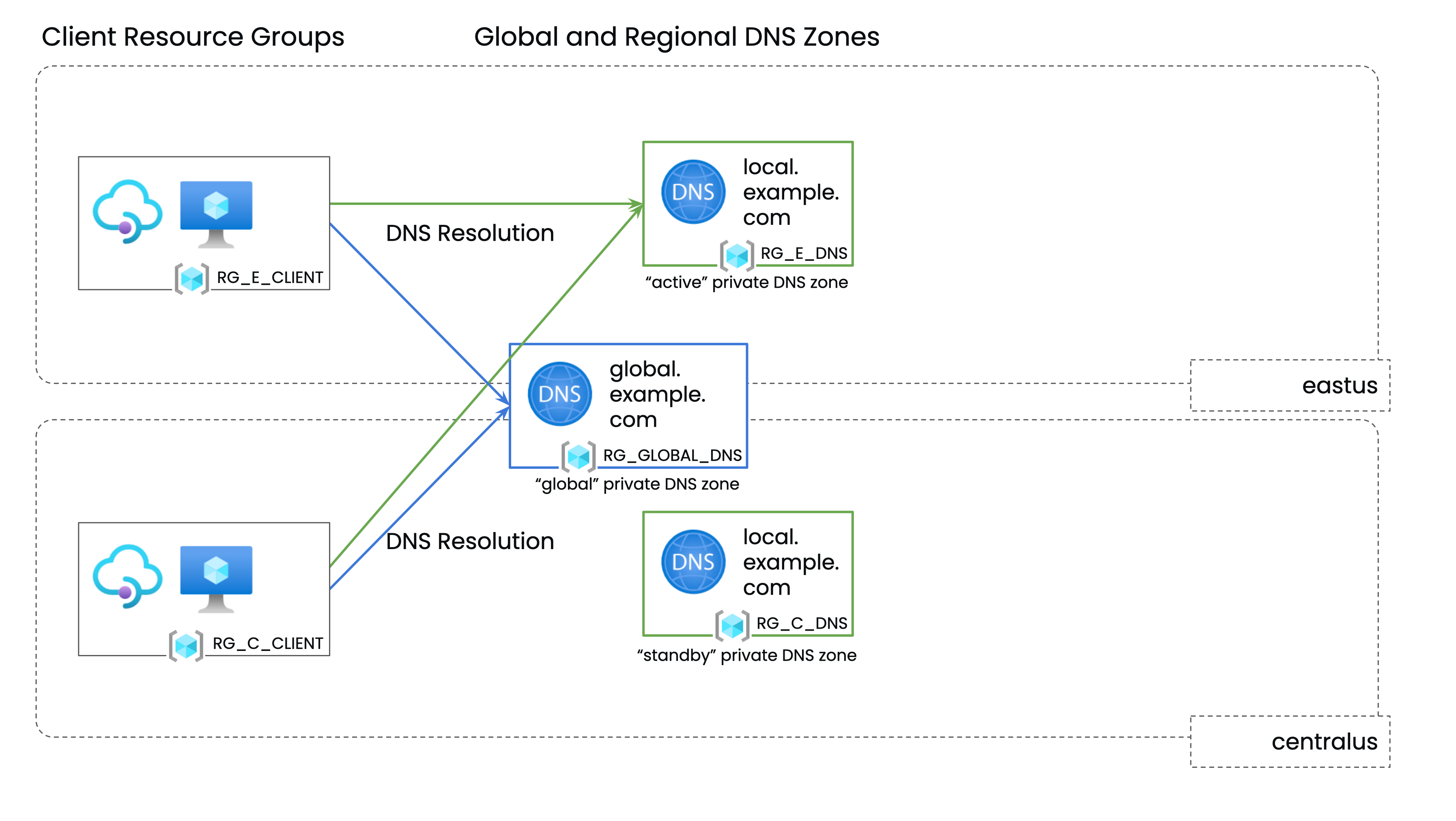
In Active-Active, each client VNet is linked to the Global zone and to the active Regional zone. The Standby zone is used by the Tetrate GSLB software, but is not used for DNS resolution by clients: