 Tetrate Global Load BalancerVersion: Latest
Create the Azure Resources
In this chapter, you'll create the necessary pre-requisite resources for the Tetrate GSLB solution on Azure. Before you begin, make sure to determine which Azure regions you intend to deploy the GSLB solution into.
These instructions explain the pre-requesites when installing on Azure. For installation on AWS, refer to the AWS prerequisites.
Step 1: Required Resource Groups
The instructions in this document use 9 resource groups, split across two Azure regions (eastus and centralus):
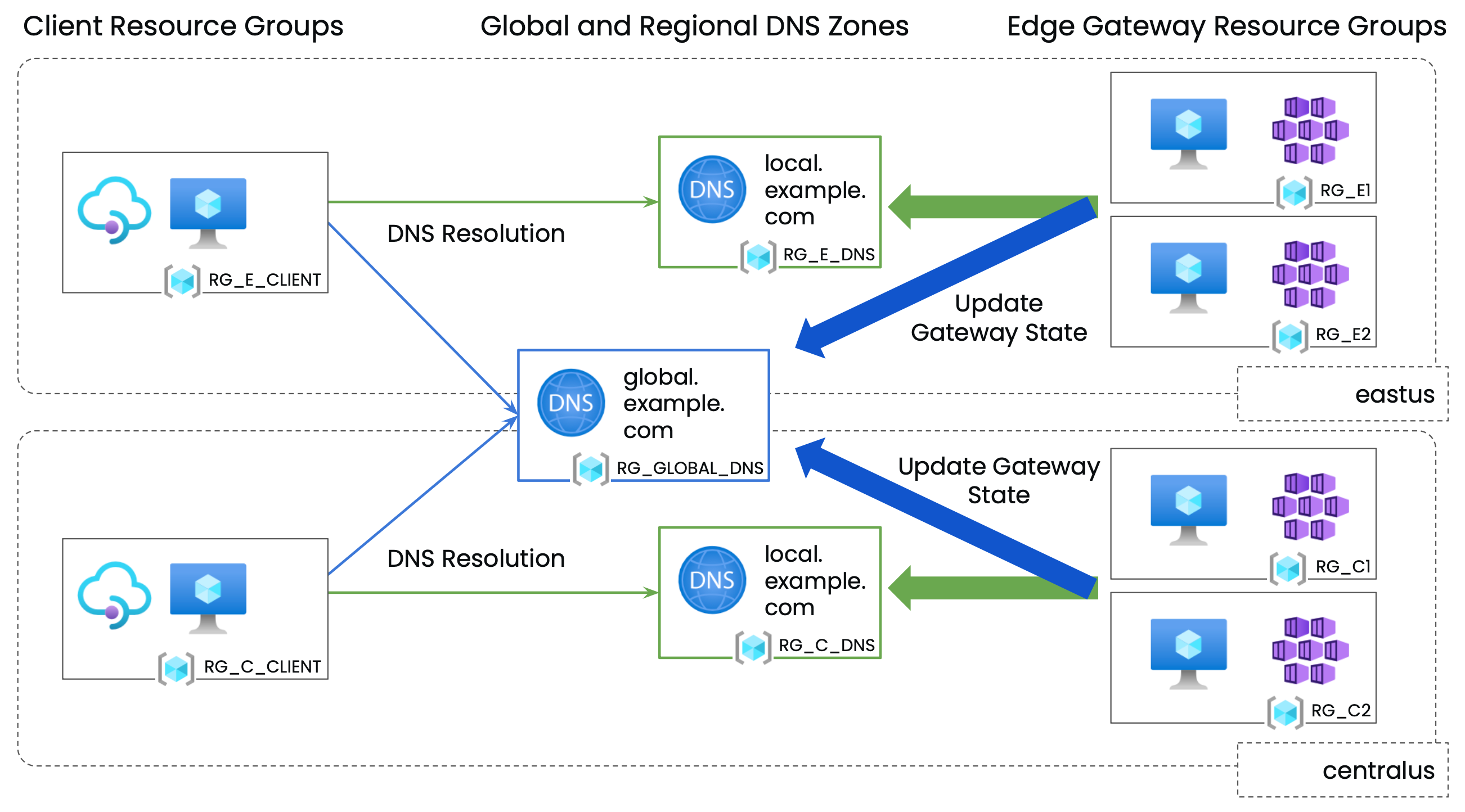
Create these groups, taking note of the names of each.
4 x Edge Gateway Resource Groups
You will need Edge Gateway resource groups in two or more Azure regions (this document uses eastus and centralus, and uses two resource groups in each region). In each Edge Gateway resource group:
- Deploy a kubernetes cluster in that will host the Edge Gateways
- Onboard the clusters into your chosen TSB management plane (not documented here)
- Deploy a VM in each, for testing purposes (optional, but recommended)
3 x Private DNS Zone Resource Groups
You will need 2 Regional Private DNS Zone resource groups in the same Azure regions as above (eastus and centralus), and a single Global Private DNS Zone resource group, in a region of your choice. The Resource Groups can be left empty.
2 x Client Resource Groups
You can create 2 Client resource groups in the same Azure regions as above (eastus and centralus). Deploy a VM in each, for testing purposes (to act as the client).
Step 2: Create the Private DNS Zones
Define Environment Variables
For convenience, define the following environment variables:
# Azure Credentials
export AZURE_SUBSCRIPTION_ID=8a42948e-6087-47d2-bdb8-b530d558db22
export AZURE_TENANT_ID=0076231c-4971-42f2-8c33-aa8680e81ea8

# Resource Groups

## Edge Gateway Resource Groups
export RG_E1=glbdemo01-0-nekh_rg
export RG_E2=glbdemo01-1-lkgi_rg
export RG_C1=glbdemo01-2-phid_rg
export RG_C2=glbdemo01-3-aldc_rg

## Private DNS Zone Resource Groups
export RG_E_DNS=glbdemo01-e-dns
export RG_C_DNS=glbdemo01-c-dns
export RG_GLOBAL_DNS=glbdemo01-global-dns

## Client Resource Groups
export RG_E_CLIENT=glbdemo01-e-client
export RG_C_CLIENT=glbdemo01-c-client


# Virtual Networks

## Edge Gateway virtual networks
export VNET_E1=glbdemo01-0_vnet
export VNET_E2=glbdemo01-1_vnet
export VNET_C1=glbdemo01-2_vnet
export VNET_C2=glbdemo01-3_vnet

## Client virtual networks
export VNET_E_CLIENT=glbdemo01-e-client_vnet
export VNET_C_CLIENT=glbdemo01-c-client_vnet

# DNS Zones

export REGIONAL_PRIVATE_DNS_ZONE=local.example.com
export GLOBAL_PRIVATE_DNS_ZONE=global.example.com
Set up the az client:
az login
az account set --subscription $AZURE_SUBSCRIPTION_ID
Create Private DNS Zones
Private DNS Zones are created in their Resource Groups, and then linked (using Virtual Network Links) to the VNETs in the Edge Gateway Resource Groups and to the VNETs in each Client Resource Group as follows:
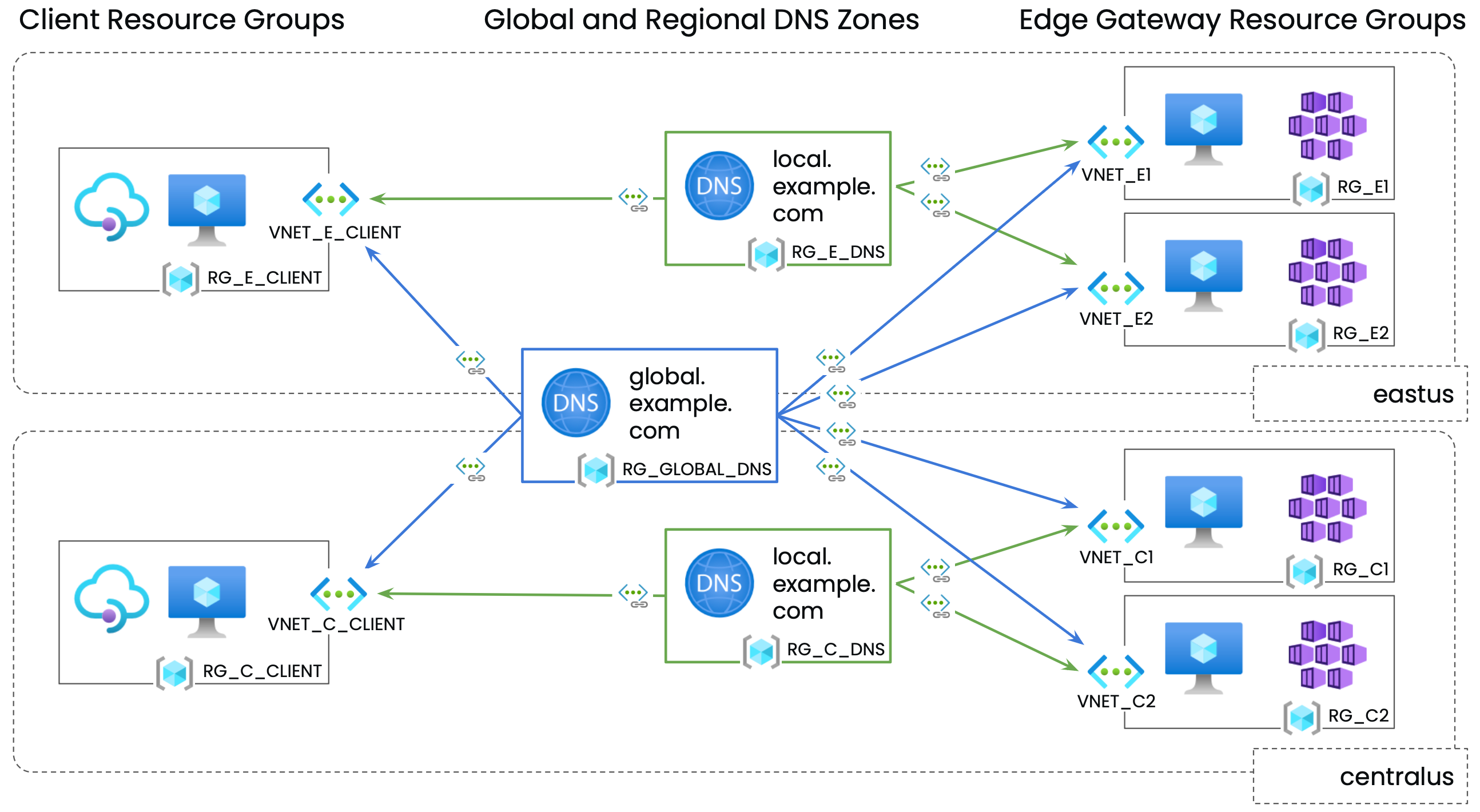
We need the following Private DNS Zones:
- A REGIONAL_PRIVATE_DNS_ZONE in the resource group RG_E_DNS in region eastus
- A REGIONAL_PRIVATE_DNS_ZONE in the resource group RG_C_DNS in region centralus
- A GLOBAL_PRIVATE_DNS_ZONE in the resource group RG_GLOBAL_DNS
They are linked as follows:
- All VNETs in eastus (Client and Edge Gateway) are linked to the REGIONAL_PRIVATE_DNS in RG_E_DNS
- All VNETs in centralus (Client and Edge Gateway) are linked to the REGIONAL_PRIVATE_DNS in RG_C_DNS
- All VNETs (eastus, centralus) (Client and Edge Gateway) are linked to the GLOBAL_PRIVATE_DNS in RG_GLOBAL_DNS
VNET links from client VNETs are needed so that clients can resolve the DNS entries. VNET links from the Edge Gateway VNETs are needed because the Tetrate GSLB solution shares state between clusters using DNS TXT records in the Global and Regional Private DNS Zones.
# Create regional Private DNS zone in eastus and configure links for resource groups in that region

az network private-dns zone create --name $REGIONAL_PRIVATE_DNS_ZONE --resource-group $RG_E_DNS

az network private-dns link vnet create --resource-group $RG_E_DNS --zone-name $REGIONAL_PRIVATE_DNS_ZONE --name REGIONALDNS-LINK-E1 --virtual-network $(az network vnet show -g $RG_E1 -n $VNET_E1 --query id -o tsv) --registration-enabled false
az network private-dns link vnet create --resource-group $RG_E_DNS --zone-name $REGIONAL_PRIVATE_DNS_ZONE --name REGIONALDNS-LINK-E2 --virtual-network $(az network vnet show -g $RG_E2 -n $VNET_E2 --query id -o tsv) --registration-enabled false
az network private-dns link vnet create --resource-group $RG_E_DNS --zone-name $REGIONAL_PRIVATE_DNS_ZONE --name REGIONALDNS-LINK-E-CLIENT --virtual-network $(az network vnet show -g $RG_E_CLIENT -n $VNET_E_CLIENT --query id -o tsv) --registration-enabled false

# Create regional Private DNS zone in centralus and configure links for resource groups in that region

az network private-dns zone create --name $REGIONAL_PRIVATE_DNS_ZONE --resource-group $RG_C_DNS

az network private-dns link vnet create --resource-group $RG_C_DNS --zone-name $REGIONAL_PRIVATE_DNS_ZONE --name REGIONALDNS-LINK-C1 --virtual-network $(az network vnet show -g $RG_C1 -n $VNET_C1 --query id -o tsv) --registration-enabled false
az network private-dns link vnet create --resource-group $RG_C_DNS --zone-name $REGIONAL_PRIVATE_DNS_ZONE --name REGIONALDNS-LINK-C2 --virtual-network $(az network vnet show -g $RG_C2 -n $VNET_C2 --query id -o tsv) --registration-enabled false
az network private-dns link vnet create --resource-group $RG_C_DNS --zone-name $REGIONAL_PRIVATE_DNS_ZONE --name REGIONALDNS-LINK-C-CLIENT --virtual-network $(az network vnet show -g $RG_C_CLIENT -n $VNET_C_CLIENT --query id -o tsv) --registration-enabled false

# Create global Private DNS zone in the resource group $RG_GLOBAL_DNS and configure virtual network links for all

az network private-dns zone create --name $GLOBAL_PRIVATE_DNS_ZONE --resource-group $RG_GLOBAL_DNS

# This makes $GLOBAL_PRIVATE_DNS_ZONE available in each of $RG_E1 $RG_E2 $RG_C1 $RG_C2 $RG_E_CLIENT $RG_C_CLIENT
az network private-dns link vnet create --resource-group $RG_GLOBAL_DNS --zone-name $GLOBAL_PRIVATE_DNS_ZONE --name GLOBALDNS-LINK-E1 --virtual-network $(az network vnet show -g $RG_E1 -n $VNET_E1 --query id -o tsv) --registration-enabled false
az network private-dns link vnet create --resource-group $RG_GLOBAL_DNS --zone-name $GLOBAL_PRIVATE_DNS_ZONE --name GLOBALDNS-LINK-E2 --virtual-network $(az network vnet show -g $RG_E2 -n $VNET_E2 --query id -o tsv) --registration-enabled false
az network private-dns link vnet create --resource-group $RG_GLOBAL_DNS --zone-name $GLOBAL_PRIVATE_DNS_ZONE --name GLOBALDNS-LINK-C1 --virtual-network $(az network vnet show -g $RG_C1 -n $VNET_C1 --query id -o tsv) --registration-enabled false
az network private-dns link vnet create --resource-group $RG_GLOBAL_DNS --zone-name $GLOBAL_PRIVATE_DNS_ZONE --name GLOBALDNS-LINK-C2 --virtual-network $(az network vnet show -g $RG_C2 -n $VNET_C2 --query id -o tsv) --registration-enabled false
az network private-dns link vnet create --resource-group $RG_GLOBAL_DNS --zone-name $GLOBAL_PRIVATE_DNS_ZONE --name GLOBALDNS-LINK-E-CLIENT --virtual-network $(az network vnet show -g $RG_E_CLIENT -n $VNET_E_CLIENT --query id -o tsv) --registration-enabled false
az network private-dns link vnet create --resource-group $RG_GLOBAL_DNS --zone-name $GLOBAL_PRIVATE_DNS_ZONE --name GLOBALDNS-LINK-C-CLIENT --virtual-network $(az network vnet show -g $RG_C_CLIENT -n $VNET_C_CLIENT --query id -o tsv) --registration-enabled false
Step 3: Create service principals for the Helm installation
Create a service principal with the 'Private DNS Zone Contributor' role for each private DNS zone
This example uses Azure service principals; you can also use Azure managed identities. Refer to the External DNS documentation where needed.
# Regional DNS Zones RG_E_DNS

az ad sp create-for-rbac --skip-assignment -n http://regional-${RG_E_DNS}-externaldns-sp > ./regional-${RG_E_DNS}-externaldns-sp.json
az role assignment create --role "Private DNS Zone Contributor" --assignee $(cat ./regional-${RG_E_DNS}-externaldns-sp.json | jq -r .appId) --scope $(az network private-dns zone show --name $REGIONAL_PRIVATE_DNS_ZONE --resource-group $RG_E_DNS | jq -r .id)

# Regional DNS Zones RG_C_DNS

az ad sp create-for-rbac --skip-assignment -n http://regional-${RG_C_DNS}-externaldns-sp > ./regional-${RG_C_DNS}-externaldns-sp.json
az role assignment create --role "Private DNS Zone Contributor" --assignee $(cat ./regional-${RG_C_DNS}-externaldns-sp.json | jq -r .appId) --scope $(az network private-dns zone show --name $REGIONAL_PRIVATE_DNS_ZONE --resource-group $RG_C_DNS | jq -r .id)

# Global DNS Zone

az ad sp create-for-rbac --skip-assignment -n http://global-${RG_GLOBAL_DNS}-externaldns-sp > ./global-${RG_GLOBAL_DNS}-externaldns-sp.json
az role assignment create --role "Private DNS Zone Contributor" --assignee $(cat ./global-${RG_GLOBAL_DNS}-externaldns-sp.json | jq -r .appId) --scope $(az network private-dns zone show --name $GLOBAL_PRIVATE_DNS_ZONE --resource-group $RG_GLOBAL_DNS | jq -r .id)
Take a note of the the appId and password values found in each -externaldns-sp.json file. These are added to the Helm values file for each installation.