 Tetrate Patch ServiceVersion: alpha
Approving and Releasing Changes
Every change to your managed data plane, whether Tetrate's automation proposed it or you did, arrives as a pull request in your GitOps repository and waits there. Your accounts hold read access, so the release signal is a command rather than GitHub's review button, which only counts approvals from accounts that could merge the change themselves. The automation seeded in your repository reads the command, checks the request, and merges it.
There are two places to send one, and it is the same command either way:
- The console, for an upgrade pull request. Open it from the Upgrades view and approve, hold, merge or close it from the panel, without leaving for GitHub.
- A comment on the request, for any change at all, including the customizations you open yourself.
This page covers the commands, the three checks they drive, the panel that sends them, the labels every automated request carries, and what makes an approval expire.
The Commands
Leave any of these as a comment on the pull request. The command has to be the first word of the comment, and an explanation can follow it on the same line, so /hold change freeze until Monday works.
| Comment | What it does |
|---|---|
/approve | Releases the change. Merges it when every check is green. |
/unapprove | Withdraws that approval. |
/hold | Pins the request shut, even once approved. |
/unhold | Lifts the hold. |
/merge | Merges now, if every check is green. |
/close | Closes the request. A later scheduled run opens it again if the upgrade is still pending. |
/help | Posts this list on the request itself. |
Anyone with access to the repository can use them, which on the managed data plane is everyone Tetrate has assigned to your customer. Anything that is not one of these commands is ignored without a reply, so you can discuss a change in the comments without the automation answering.
Approving a request that is not ready to merge is harmless: /approve records your approval and replies with whatever is still blocking. Lifting a hold with /unhold then merges the request on the spot. A request waiting on Tetrate merges once the review lands and someone comments /merge, because a Tetrate review sets the check without deciding that the moment is right for your cluster.
For an upgrade request, the console sends every one of these but /help as a button. What travels is still a comment on the request, posted under your GitHub account, so nothing on this page reads differently for a command sent that way; see Releasing an Upgrade in the Console.
The Three Checks
Every pull request carries three checks that say exactly where it stands:
| Check | What it means | What turns it green |
|---|---|---|
customer-approval | Yours: whether your organization has released this change. | Someone approves it. |
customer-hold | The pin: whether someone has asked for this to wait. | Nobody has held it, or someone has since lifted the hold. |
tetrate-approval | Whether Tetrate has to look at the change. | The request touches only files you own, or someone at Tetrate approves it. |
The files you own for this purpose are values-versions.yaml, values-customer.yaml, and .github/upgrades.yaml, at any level of the repository. A request confined to those needs nothing but your approval, which is why an automated upgrade merges the moment you release it. A request touching anything else, a chart, a template, or the automation itself, waits for a Tetrate review as well, and that includes requests Tetrate opened.
A hold leaves customer-hold pending rather than failing it. Holding is a decision to wait, not something that went wrong, and a red cross on a pending upgrade reads as breakage.
These three are the gate: the automation refuses to merge unless each of them is green. Anything else reported on a request, your own lint or validation job for instance, is shown alongside them and holds nothing.
Releasing an Upgrade in the Console
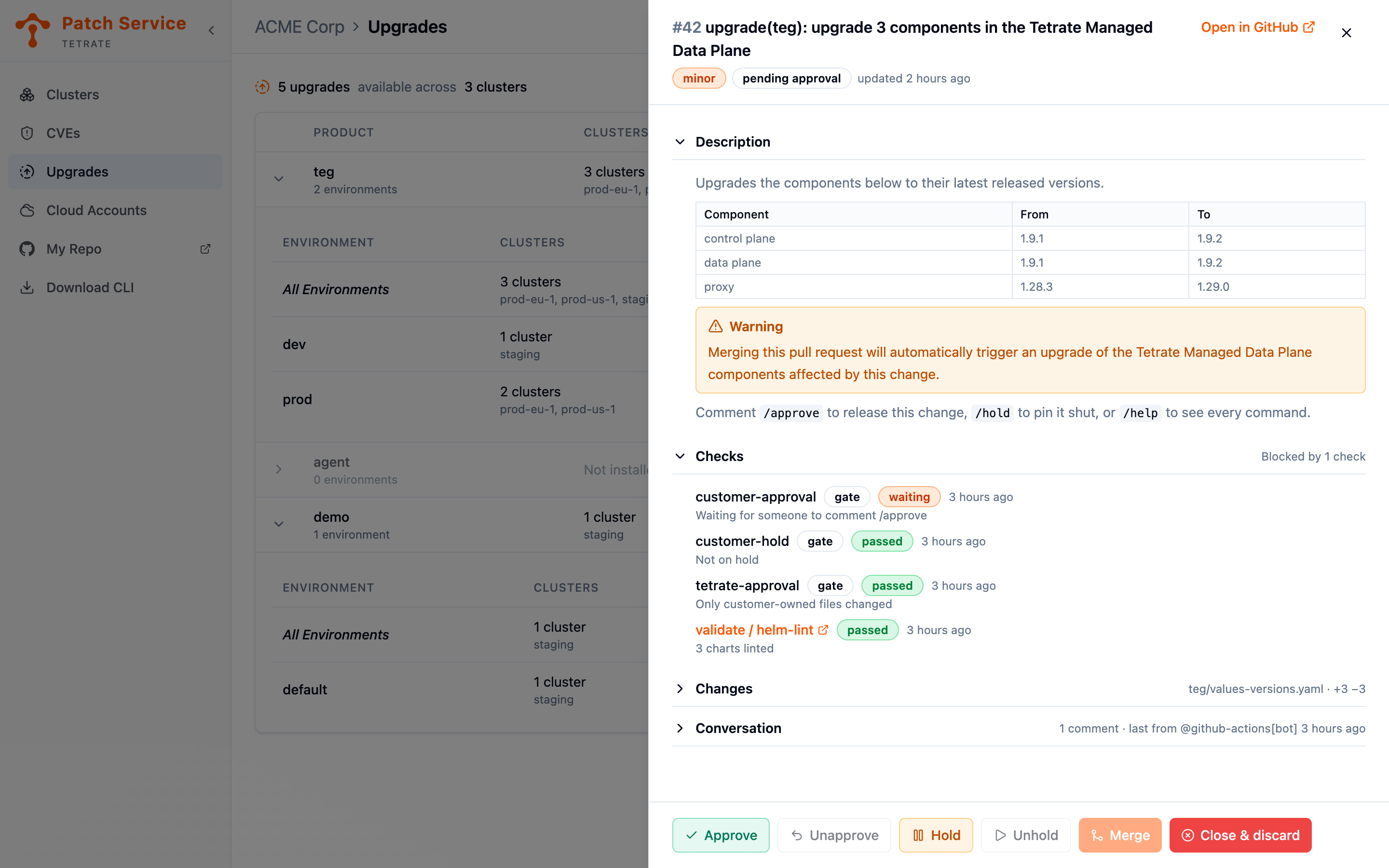
Clicking a request number in the Upgrades view opens that request in a panel over the list. The panel holds everything deciding on an upgrade takes — what it says it does, where its checks stand, the change it makes, and what has been said about it — along with the commands that release it. The ordinary case, reading a version bump and releasing it, never leaves the console.
The list stays behind the panel deliberately. Which layer the request upgrades and which clusters merging it would reach are on the row you opened it from, and both are part of the decision you are making.
The Panel Header
The top of the panel is the request's identity and its state: the number and title, the same size, approval and hold badges the list carries, and when it last changed. Open in GitHub is always there, whatever else the panel offers, and the panel closes with the ×, with Escape, or with a click outside it.
Those badges are read from the request itself rather than copied from the row you clicked. The row may be up to half a minute old, so a request somebody else approved while you were reading the list shows as approved the moment the panel opens, with the buttons that follow from it.
What the Panel Shows
Below the header the request is four sections, each folded behind a line that says what is in it.
| Section | What it holds | Open when the panel opens |
|---|---|---|
| Description | The request's body, as GitHub renders it | Always |
| Checks | Everything reported on the commit the request proposes | Only when something is failing, waiting, or unreadable |
| Changes | The diff the request makes | No |
| Conversation | The comments and commands on the request | No |
A shut section is not a hidden one: the line beside its name is the answer for the ordinary case. All 4 checks passed and teg/values-versions.yaml · +3 −3 together describe a routine upgrade completely, and the sections stay shut because they have already said what they contain. Open any of them and it stays as you left it while the panel is open.
Description
The body the automation wrote, rendered rather than shown as source: a table of the components moving and the versions they move between, the warning that merging rolls the change out to your clusters, and the reminder of which commands release it.
Checks
Everything reported on the commit the request currently proposes. The three gates come first and are marked gate, because only those hold the request shut.
| State | What it means |
|---|---|
| passed | The check is green. A gate reading anything else is not satisfied. |
| waiting | Nothing has settled yet. Orange on a gate, because a gate waiting is a gate waiting for somebody; gray on an ordinary check, which will answer on its own. |
| failed | The check did not pass, or the job that judges it broke. |
| no verdict | The check reported without deciding anything. |
Each row carries whatever the check said about itself, which is the useful part: tetrate-approval waiting names the file that pulled Tetrate in, and customer-approval passed names who approved it.
This section and the badges in the header deliberately overlap. The header is the answer at a glance; these rows are the evidence, with a time and an explanation on each. They can briefly disagree while a check is still being written, and that disagreement is information rather than something to look past.
Changes
The diff, one file at a time, with the summary line naming the file and the lines added and removed. For an upgrade request it should be version entries and nothing else, and that is the thing worth confirming here.
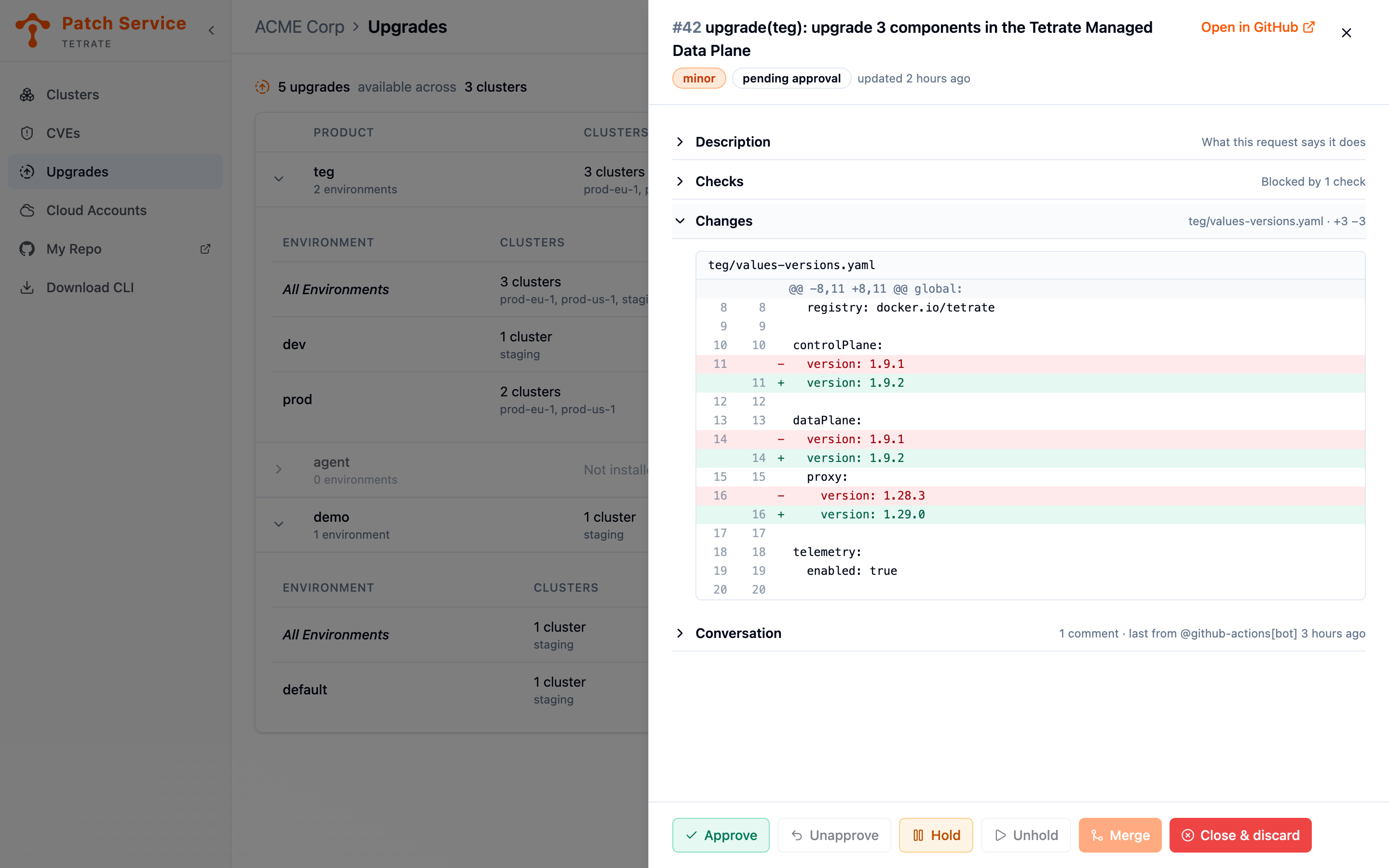
A change too large to render here is never shown in part as though it were the whole. The panel says so and points at GitHub, where you can read all of it.
Conversation
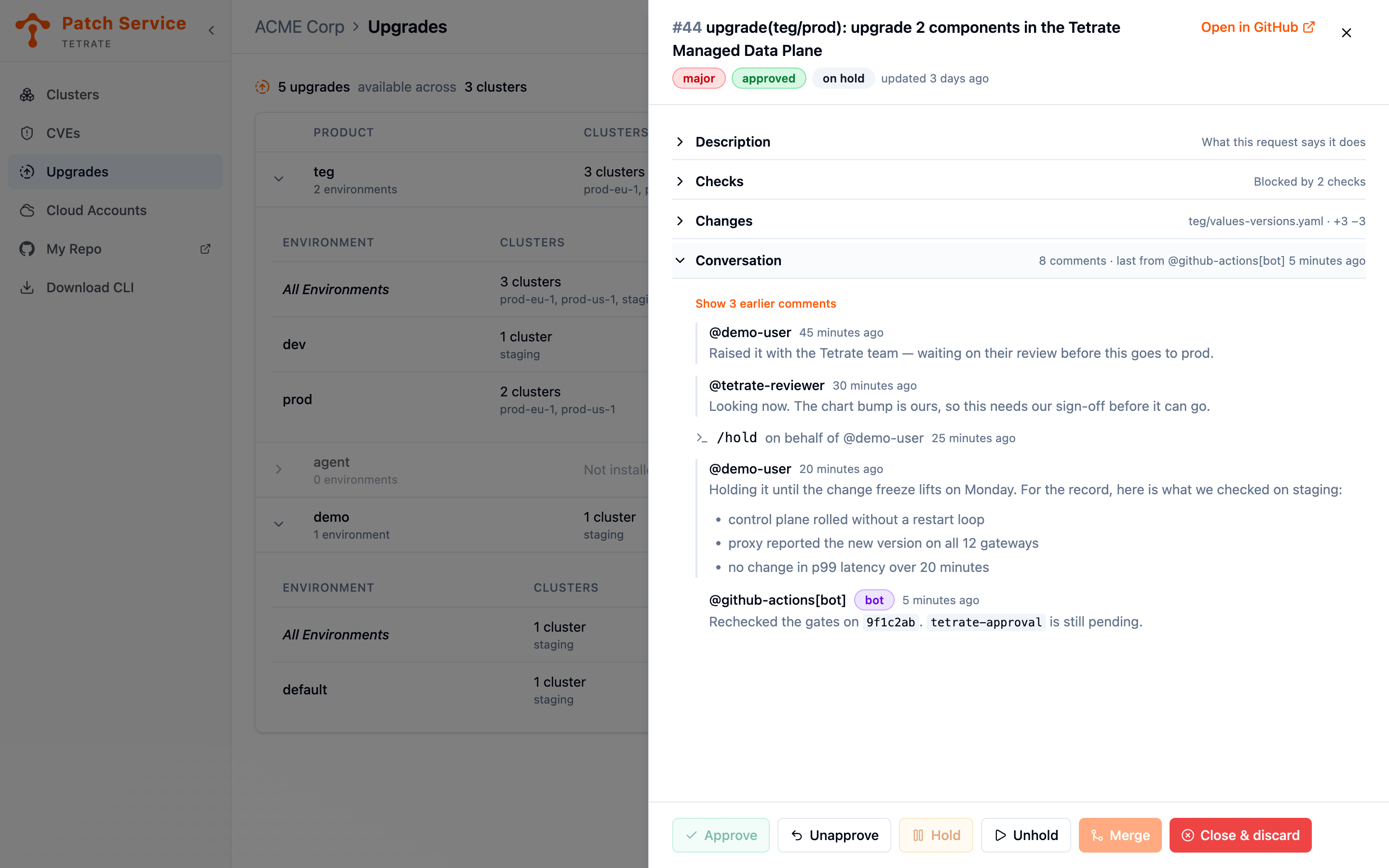
The comments on the request, oldest first, with the most recent shown and the rest folded behind a count. Commands collapse to a single line each — /hold on behalf of @demo-user — so a request somebody has worked on reads as the ledger of who asked for what, with whatever people actually wrote standing out between those lines. Comments from automation are marked bot.
This is also where the automation explains itself. A merge it refused is answered in a comment on the request and nowhere else, so when a request will not land, its reason is in this section.
The Command Buttons
The buttons along the bottom send the commands above, without opening GitHub.
| Button | Command it sends | Unavailable when |
|---|---|---|
| Approve | /approve | The request is already approved. |
| Unapprove | /unapprove | Nobody has approved it. |
| Hold | /hold | It is already on hold. |
| Unhold | /unhold | It is not on hold. |
| Merge | /merge | It is on hold, is not approved, or a gate has not passed. |
| Close & discard | /close | Never. |
Every command is shown whatever the request's state, so the set of things you can do does not shift around under the pointer as that state changes. The ones that would do nothing are disabled and say why when you hover them. Merge and Close & discard ask for confirmation first, because they are the two that change what is running rather than what is recorded.
A request that has already merged or closed offers no commands at all, and the panel says so rather than drawing buttons that cannot work.
A Command Is a Comment, Not an Outcome
Pressing one of those buttons posts its command as a comment on the pull request, attributed to you: /approve on behalf of @your-github-account. The automation in your repository is still the only thing that merges anything, exactly as when you type the comment yourself. Nothing about the gate changes because the command came from the console.
So the panel says what it sent, not what happened:
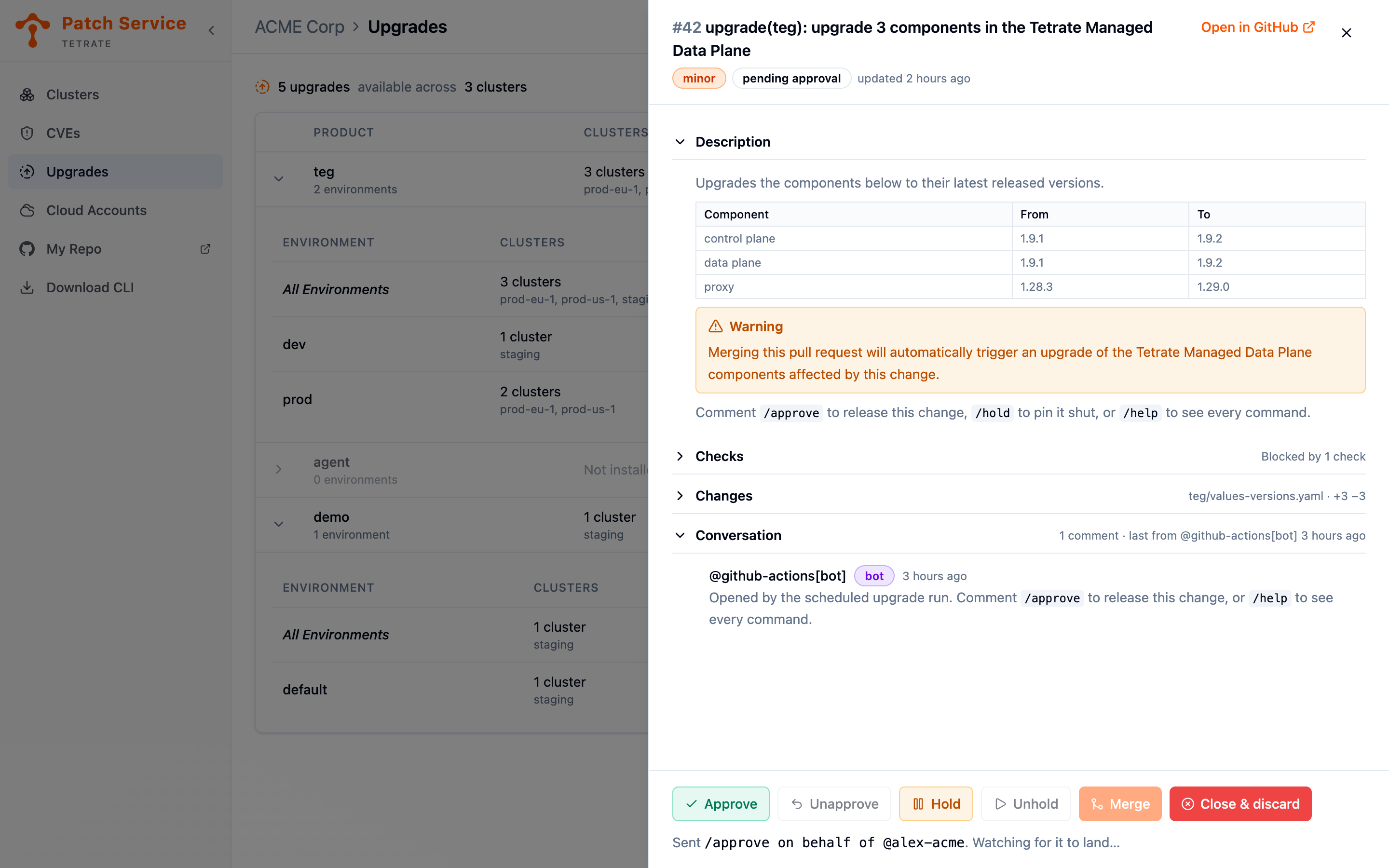
For the next minute the panel re-reads the request every few seconds and opens the conversation, so you can watch the command land and the automation answer it. Once the request has caught up, the line goes away and the badges in the header carry the news instead — which is the better claim, because those were read back from the request rather than assumed from the button.
If the line changes to say the command has not landed yet, the automation may still be working or may have declined it. The Conversation section says which. A merge refused by a gate never lands, and the panel will not pretend otherwise.
Who Can Send Commands
Commands from the console need a GitHub account behind your sign-in, because the comment names it. Sign in with GitHub and the buttons are there; sign in another way and the panel says so and offers the link to the request instead, where you can comment as yourself.
The account is taken from your signed-in session and never from the browser, so nobody can send a command in somebody else's name. What the record shows is who actually pressed the button.
The command is posted by the Patch Service on your behalf, and the service's own account holds access to your repository. Your repository's check on who may comment therefore does not narrow this further: anyone signed in to the console for your organization, with a GitHub account behind that sign-in, can release a change. Removing someone's access to the repository alone does not stop them — remove their console access too.
When Something Cannot Be Read
The panel never turns something it could not read into something that is fine.
- Checks it could not read are said to be missing rather than passing, and nothing missing from the list is claimed to have passed. The Merge button stays available, deliberately: a gate nobody could read is not a red one, and the repository is what actually decides — it will refuse with an explanation on the request if the merge cannot go.
- A conversation it could not read says so rather than showing "no comments", which is the reading that would stop you looking for the reason a merge was refused.
- A request it could not re-read keeps the last reading on screen, says that it has stopped refreshing on its own, and offers to try again. A view that quietly went stale while still looking live would be worse than one that admits it.
Staging Across Environments
Because there is one request per layer, releasing them in order is the intended rhythm rather than a workaround: release the dev request, watch the rollout reach the clusters that environment runs on, then release prod. Watching the Rollout covers what confirms the first one landed before you release the second.
Hold and freeze answer different questions here. /hold pins one request through a change freeze, including one already approved; freezing an environment stops it being offered upgrades at all.
Labels
Checks say where a request stands; labels are what let you sort a list of them without opening any. Every request the automation opens carries them, and GitHub can filter and subscribe on them, which a title cannot.
| Label | What it tells you |
|---|---|
automated-version-bump | The request was opened by the upgrade automation. Filtering on it separates Tetrate's upgrades from your organization's own pull requests. |
<product>/<environment>, or <product>/global | The layer the request upgrades: one environment, or the product defaults every environment inherits. The defaults are qualified as global rather than default, since an environment may actually be called that. |
upgrade/major, upgrade/minor, upgrade/patch | How big a version jump the request makes, computed from the release versions it moves rather than from image tags. A request whose components are not versioned as semver carries none of these rather than a guessed one. |
approved, on-hold | The gate state, mirroring customer-approval and customer-hold for scanning. |
The layer label is fixed for a request's life, because its branch is. The size label is not: a bigger release landing on an open request updates it in place, and the label moves with it, so exactly one size is ever on a request. These same labels are what the Upgrades view reads for the size and the layer of each request it lists.
Approval Binds to the Commit
An approval applies to the exact commit it was given on, so pushing a new commit clears it and what you approved is always what merges. Two ordinary events count as new commits:
- A newer release landing on an open upgrade pull request. The automation updates the request in place rather than opening a second one, and the update asks for your approval again.
- The Update branch button, which brings a request that has fallen behind
mainup to date by adding a commit to it.
In both cases the request goes back to waiting for an approval, and re-running the checks never silently revokes an approval that still stands on the current commit. Approve again once you have read the new diff.
Choosing How Approval Merges
.github/upgrades.yaml decides what approving does:
merge-on-approval: true   # merge as soon as every check is green
merge-method: squash      # merge, squash or rebase
With merge-on-approval set to false, approving only marks the request and says so, and /merge or the Merge button lands it. Split them when the decision to release and the moment of the rollout belong to different people or different hours.
The settings file is one of the files you own, so change it the way you change any other: open a pull request, and approve it yourself.
Next Steps
- Receive and view upgrades for how Tetrate's automated requests arrive, where the console lists them, and what confirms a rollout.
- Work with your repository when the change you want to release is your own customization.
- Read Managed Data Plane for why Git is the only channel between Tetrate and your clusters.