 Tetrate Patch ServiceVersion: alpha
Receiving and Viewing Upgrades
On the managed data plane, an upgrade is a pull request bumping pinned versions in your repository: automation does the mechanical work of noticing a release and preparing the change, and you decide when each environment takes it.
This page covers how those requests arrive, where the console shows the ones waiting on you, and what proves an upgrade actually reached your clusters. Releasing one is Approving and Releasing Changes.
How Upgrade Pull Requests Arrive
A scheduled job seeded in your own repository compares every pinned image against the release catalog daily and opens an upgrade pull request when a tracked image is behind its latest release. The job is deliberately narrow:
- It opens pull requests, never commits. The default branch is yours; automation only ever proposes.
- Each pull request modifies exactly one version file: one layer, one diff, one decision.
- There is at most one open pull request per layer. A newer release updates the open pull request in place, and a manual bump that makes it unnecessary closes it automatically.
- It runs with your repository's own credentials against the public catalog. No Tetrate credential exists anywhere in the loop.
- It sets the three approval checks on every request it opens or updates, so an upgrade always arrives waiting on your approval and never on nothing.
- It labels each request with the layer it upgrades and the size of the version jump it makes, so a list of them can be sorted without opening any.
Because there is one pull request per layer, product defaults and each environment upgrade separately: dev can be a week ahead of prod, and that gap is staging, not drift.
Each request names the components it moves and the versions it moves them between, and its diff is exactly those entries and nothing else. Customer files never appear in one, which is what makes an automated upgrade safe to read quickly.
Chart revision bumps are always human-authored, from Tetrate's side, so a chart change never rides along silently with an image bump.
Seeing What Is Waiting
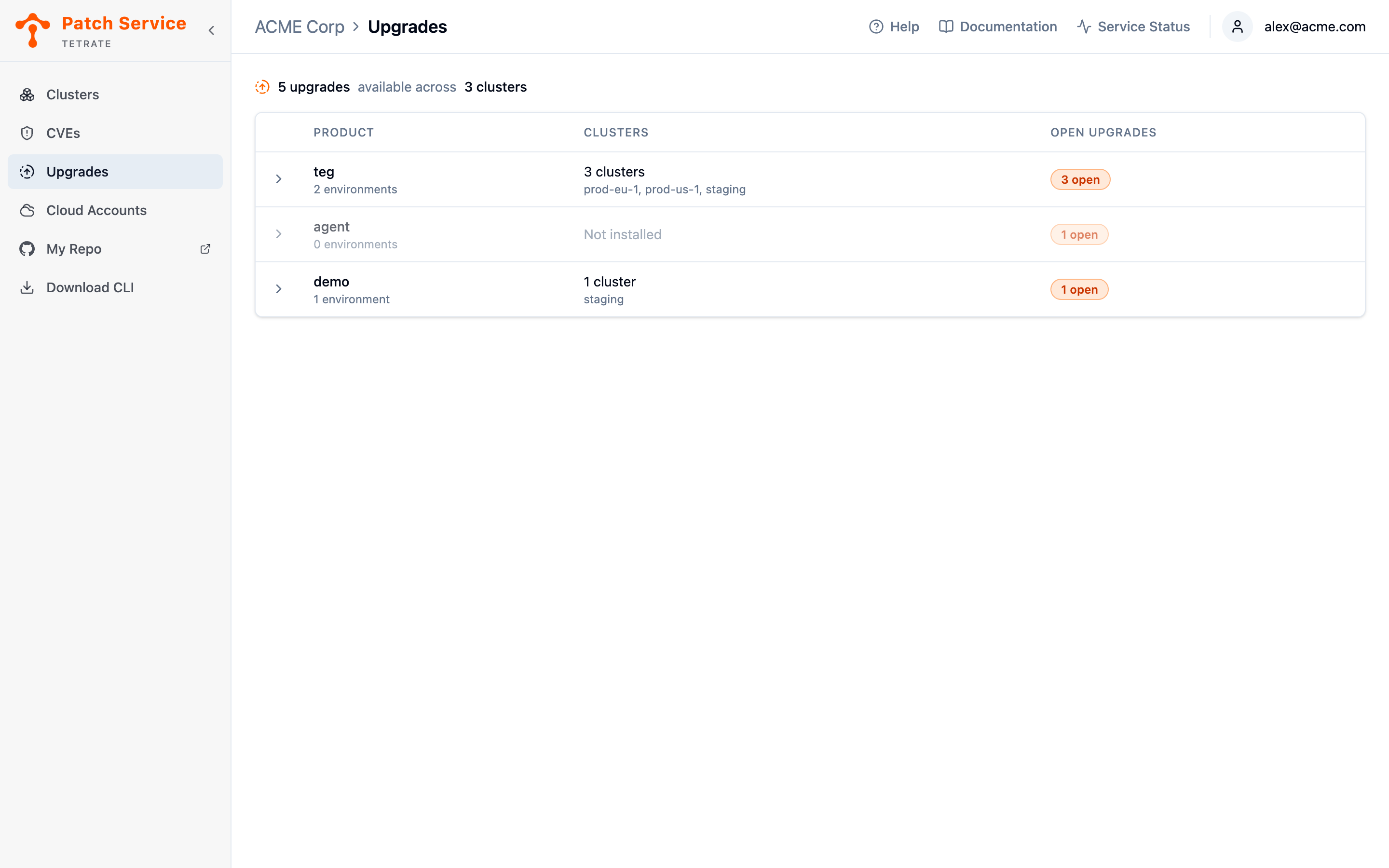
The Upgrades view is the console's answer to "what is waiting on us?". It lists your managed products rather than your clusters, because that is how an upgrade is scoped: one request covers a product's defaults or a single environment, never one cluster. Every row expands into the requests open against it and names the clusters merging one would reach.
The view appears in the sidebar only for organizations on the managed data plane. Without a GitOps repository there are no pull requests for it to show.
Reading the Product List
One row per product, with the products that have something waiting listed first.
| Column | What it tells you |
|---|---|
| Product | The product's name, with how many environments it deploys to beneath it. |
| Clusters | How many clusters run the product, and their names. Not installed means the product is seeded in your repository but is not running anywhere yet. |
| Open upgrades | How many pull requests are waiting across the product's defaults and all of its environments, or None. |
A product that is not installed anywhere is dimmed but still listed, because an upgrade can be open against it: the pull requests live in your repository, and the repository does not wait for a cluster to exist. It is precisely the row a list of clusters could never show you.
Expanding a Product
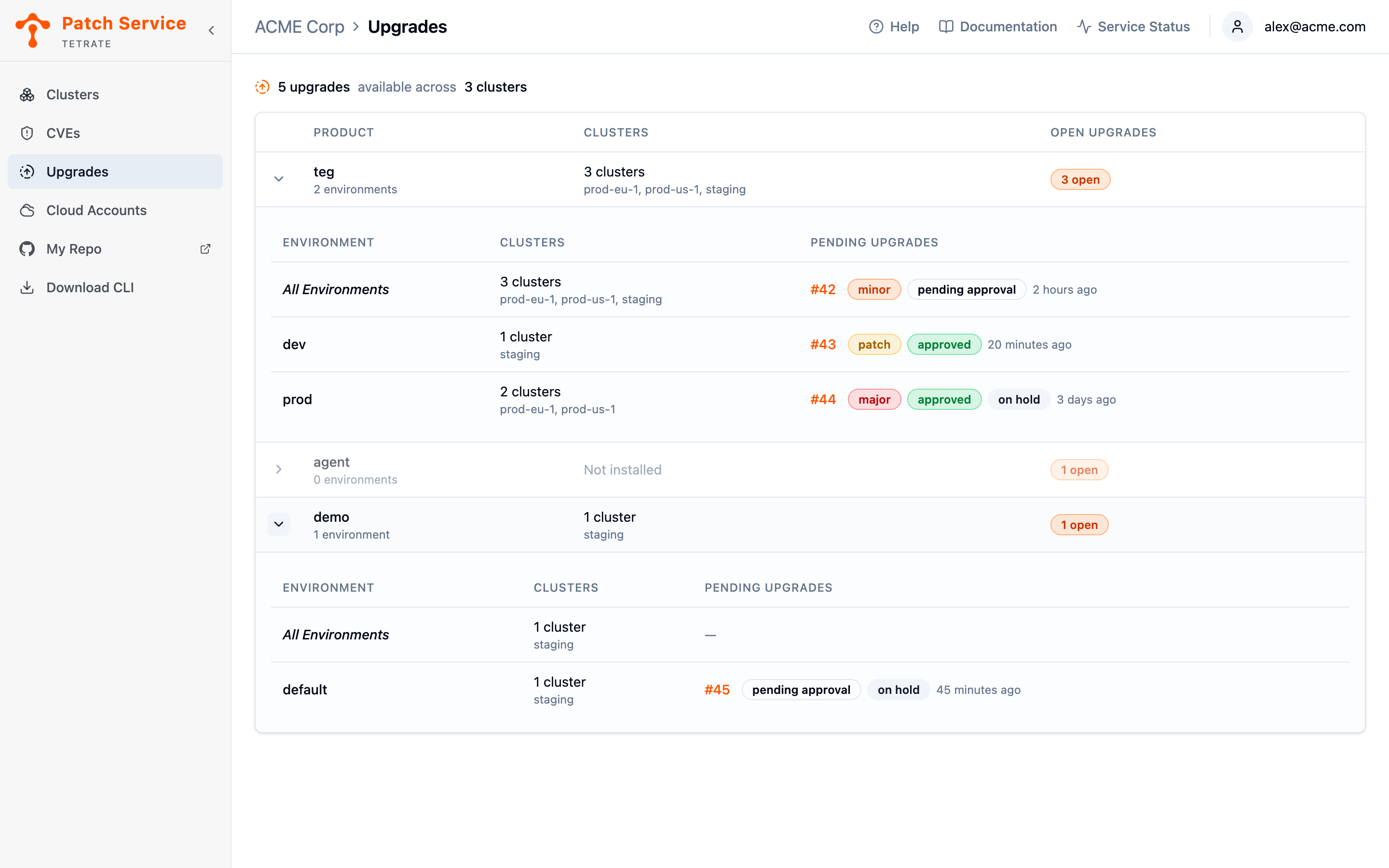
Expand a row and the product opens into one line per layer an upgrade can target:
- All Environments comes first: the product's own defaults, which every environment inherits unless it overrides the same component. A request here reaches every cluster running the product.
- Each environment follows, with only the clusters that environment runs on.
They are separate lines because they are separate pull requests, merged independently. That is what makes staging real rather than aspirational: release the dev request, watch the rollout, then release prod. A layer with nothing waiting shows a dash.
Reading a Pending Upgrade
Each pending upgrade is one line: the pull request number, followed by the badges that say what it is and where it stands, and when it last changed.
| Badge | What it means |
|---|---|
major, minor, patch | How big a version jump the request makes, on an escalating scale from yellow to red. A request carries no size badge at all when its components are not versioned as semver, a date-based version for example, because the automation does not guess at one. |
| pending approval | Nobody has released the request yet. This is the state that needs someone to act, which is why it is named rather than left blank. |
| approved | Somebody in your organization has approved it. |
| on hold | Somebody has put it on hold, so the request will not merge until the hold is lifted. |
Approval and a hold are independent, so a request can carry both: approved, and deliberately paused for a change freeze. Both are shown for that reason, since knowing whether the work of approving has already been done is exactly what someone lifting a hold needs.
The size badge can change while a request is open. A bigger release landing on it before you merge updates the request in place, and its badge moves with it, so a request opened as a patch bump can be a minor one by the time you read it.
Only the requests the automation opened appear here. Your own pull requests in the repository, a customization or a settings change, are yours to track on GitHub and are never counted as pending upgrades.
If the Patch Service cannot read your repository, a banner says so and the upgrade cells read Unknown rather than showing nothing. An empty list would claim there is nothing waiting, which is the one answer that would be wrong. The products and their clusters are still listed, because those come from the Patch Service's own records.
The number is the control: clicking it opens the request in a panel over the list, with its description, its checks, its diff and its conversation, and with the buttons that release it. That panel is where an upgrade is decided, and Approving and Releasing Changes covers it.
Watching the Rollout
This view is about what is still open, so a merged request leaves it straight away. Whether the upgrade actually reached your clusters is a different question, answered by a different source. From the merge, the loop closes on evidence rather than assumption:
- ArgoCD picks up the merge on its next sync and rolls the new versions out.
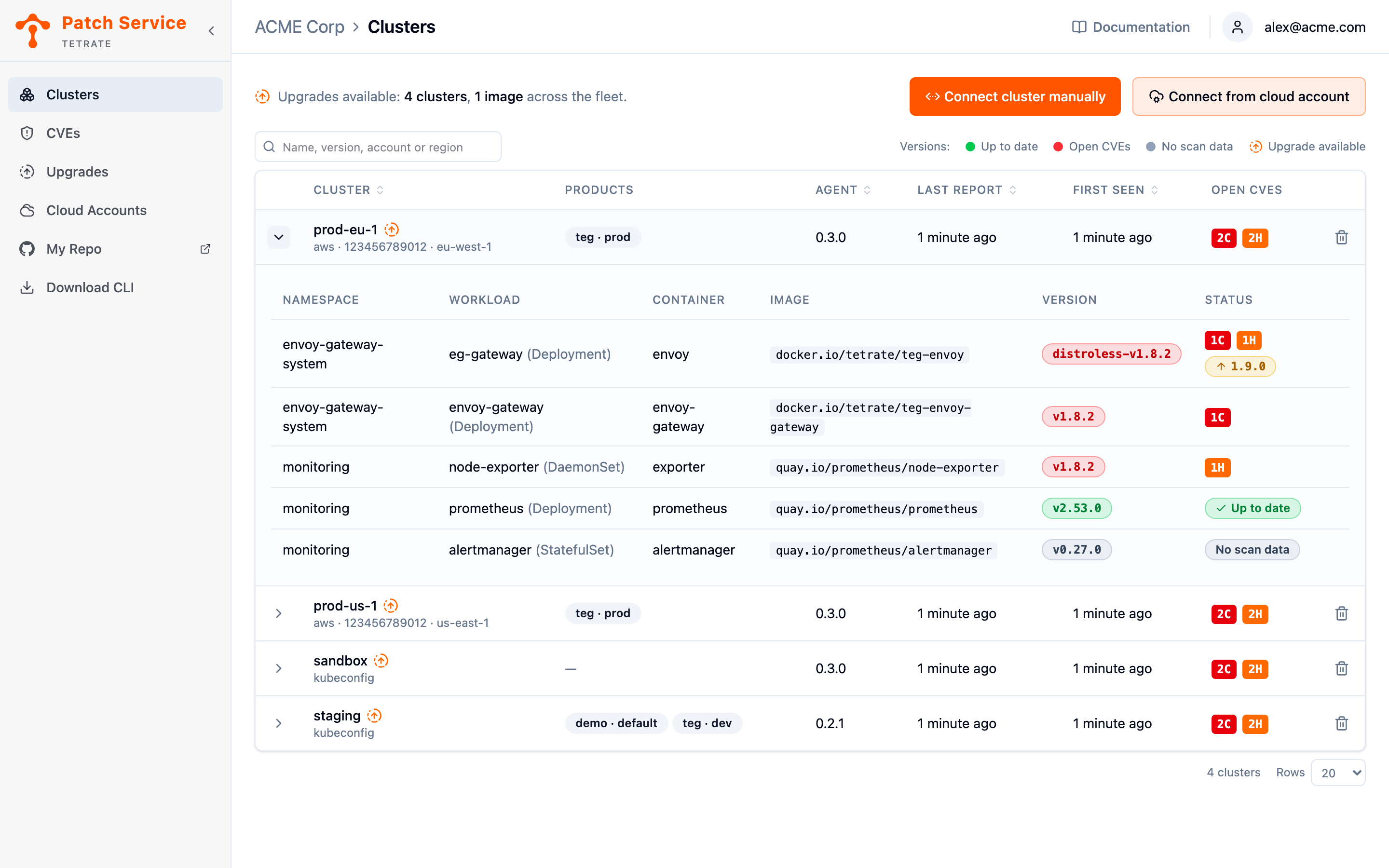
- The agent reports the new images in its next snapshot, so the containers in the Clusters view show the new versions and their Upgrade available badges clear.
- The next scan no longer finds the fixed CVEs on the new image, so the old image's findings resolve.
An upgrade that merged but has not rolled out is therefore gone from the Upgrades view and still visibly old in Clusters, which is the honest pair of answers rather than one optimistic one.
Until the agent observes the new images, the console keeps showing the old version, and that honesty is the feature: a merged-but-stuck rollout stays visible instead of being assumed done.
Freezing an Environment
An image participates in automated bumps because its entry carries its catalog coordinates, the component and variant to track. Removing those coordinates from an environment's version file deliberately freezes that environment: the daily job stops proposing bumps for it until the coordinates are restored. Freezing is the sanctioned way to hold an environment back; hand-editing pins is not, because the automation would immediately propose moving them again.
Freezing and holding answer different questions. Freeze an environment when it should stop being offered upgrades at all; hold a single request when the upgrade is right but the timing is not.
Next Steps
- Approve and release changes for the commands that release a request, the checks that gate it, and the console panel that sends them.
- Remediate vulnerabilities to see how releasing these pull requests is the managed answer to actionable findings.
- View your clusters to confirm the new images running after a rollout, which is what makes an upgrade done.
- Work with your repository for the layout the pull requests land in and the customer files they never touch.
- Read Release Catalog for where the daily comparison gets its truth.