 Tetrate Service BridgeVersion: 1.12.x
Canary Progressive Delivery Using Argo Rollouts
There are two ways to configure Tetrate Service Bridge to use Argo Rollouts to automate canary rollouts:
- This document describes the easy 'Bridged Mode' integration.
- The older process, described here, explains how to integrate using TSB's Direct Mode and TSB OAP
Argo Rollouts are managed by an argo controller, and dynamically manage weights according to rules in an Argo Rollout CR to perform managed canary or blue-green rollouts of new services.
In bridged mode, TSB uses a ServiceRoute object to represent how traffic for a named service (e.g. bookinfo/productpage-rollout.bookinfo.svc.cluster.local) is distributed across instances of that service. ServiceRoutes are used to perform weighted distribution of traffic across two or more labelled sets of service instances. These services may be exposed through gateways, using a TSB Gateway resource, or may be used internally.
Behind the scenes, the XCP component in TSB creates Istio VirtualService resources; one to handle mesh routing to the service instances and multiple to represent each Gateway route.
How to use Argo Rollouts with TSB
The example below uses Argo Rollouts to manage the canary rollout of the productpage component of the Istio bookinfo application.
First, install the argo controller in your cluster:
kubectl create namespace argo-rollouts
kubectl apply -n argo-rollouts -f https://raw.githubusercontent.com/argoproj/argo-rollouts/stable/manifests/install.yaml
Add the Argo Kubectl plugin.
Deploy Bookinfo
Deploy the Bookinfo app and expose it through a gateway as described in the Getting Started documentation.
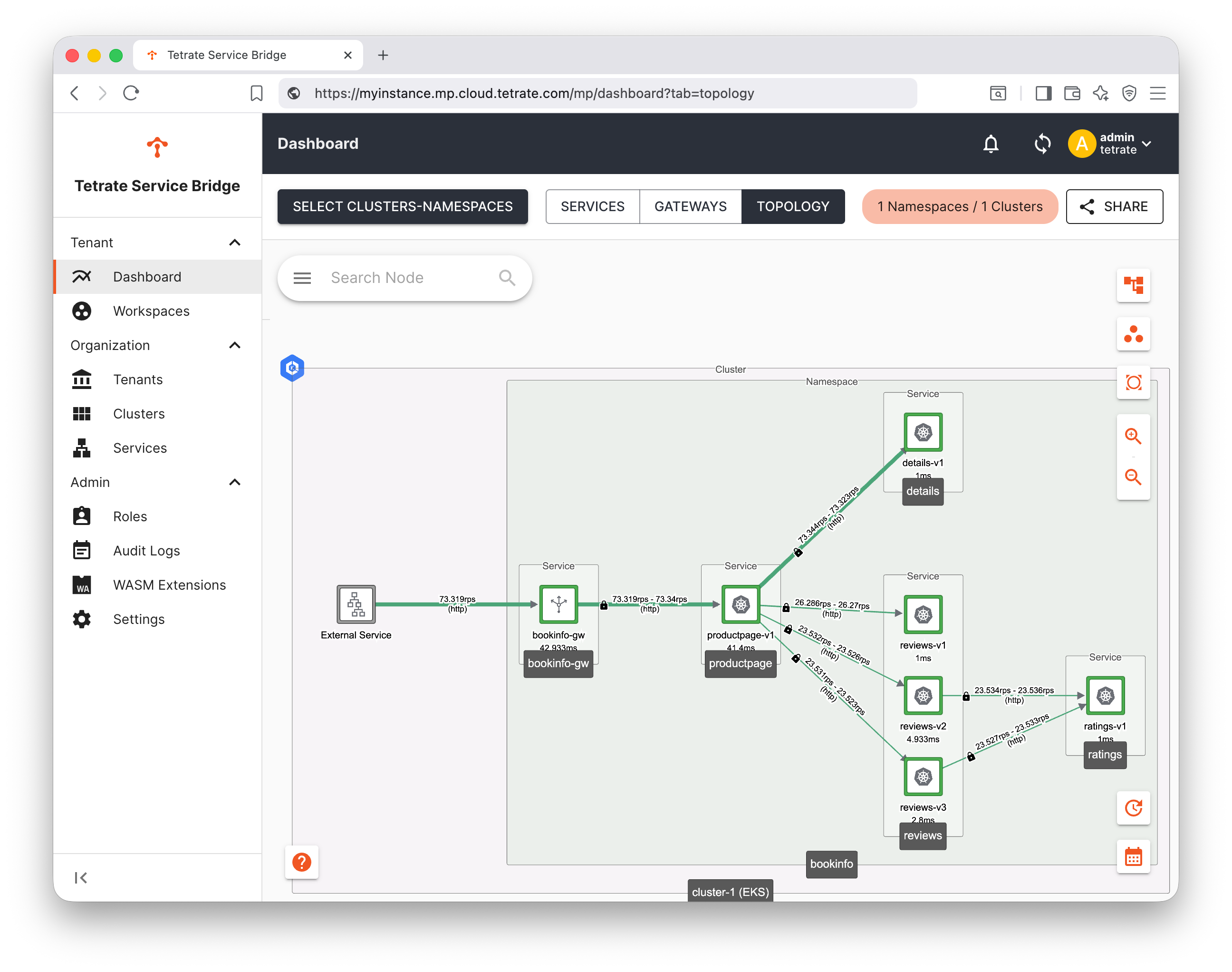
Forward some test traffic to the application and observe how traffic is distributed:
Create a Rollout
We will use a rollout by upgrading the productpage component. The deployment of this component is managed by the Argo Rollout, and we'll use a new productpage-rollout service for this.
Deploy a TSB ServiceRoute
Save this ServiceRoute definition as
productpage-sr.yaml:productpage-sr.yamlapiVersion: traffic.tsb.tetrate.io/v2
kind: Group
metadata:
organization: tetrate
tenant: default
workspace: bookinfo-ws
name: bookinfo-tgroup
spec:
configMode: BRIDGED
namespaceSelector:
names:
- "*/bookinfo"
---
apiVersion: traffic.tsb.tetrate.io/v2
kind: ServiceRoute
metadata:
name: productpage-service-route
organization: tetrate
tenant: default
workspace: bookinfo-ws
group: bookinfo-tgroup
spec:
service: "bookinfo/productpage-rollout.bookinfo.svc.cluster.local"
portLevelSettings:
- port: 9080
trafficType: HTTP
subsets:
- name: canary
labels:
app: productpage-rollout
weight: 0
- name: stable
labels:
app: productpage-rollout
weight: 100
argoRollout: {}Apply this TSB configuration using
tctl:tctl apply -f productpage-sr.yamlVirtualService and DestinationRule namesWhen you provision this ServiceRoute, TSB will create corresponding VirtualService and DestinationRule resources in the same namespace, with the same name as the ServiceRoute:
VirtualService
kubectl get virtualservices.networking.istio.io -n bookinfoNAME GATEWAYS HOSTS AGE
productpage-service-route ["mesh"] ["productpage-rollout.bookinfo.svc.cluster.local"] 14s
vs-bookinfo-tetrate-io ["bookinfo/bookinfo-gateway"] ["bookinfo.tetrate.io"] 3m19sDestinationRule
kubectl get destinationrules.networking.istio.io -n bookinfoNAME HOST AGE
productpage-service-route productpage-rollout.bookinfo.svc.cluster.local 76sYou must specify these same names in the corresponding Argo Rollout resource (see below).
If necessary, you can specify alternate names in the ServiceRoute, as follows:
  argoRollout:
    virtualServiceName: productpage-rollout-vs
    destinationRuleName: productpage-rollout-dr
Define the Argo Rollout Strategy
The Argo rollout is deployed as follows; save this as
productpage-rollout.yaml:productpage-rollout.yamlapiVersion: argoproj.io/v1alpha1
kind: Rollout
metadata:
name: productpage-rollout
namespace: bookinfo
spec:
replicas: 1
strategy:
canary:
trafficRouting:
istio:
virtualService:
name: productpage-service-route
destinationRule:
name: productpage-service-route
canarySubsetName: canary
stableSubsetName: stable
steps:
- setWeight: 10
- pause:
duration: 10m
selector:
matchLabels:
app: productpage-rollout
template:
metadata:
labels:
app: productpage-rollout
spec:
serviceAccountName: bookinfo-productpage
containers:
- name: productpage
image: docker.io/istio/examples-bookinfo-productpage-v1:1.20.2
imagePullPolicy: IfNotPresent
ports:
- containerPort: 9080
volumeMounts:
- name: tmp
mountPath: /tmp
volumes:
- name: tmp
emptyDir: {}
---
apiVersion: v1
kind: Service
metadata:
labels:
app: productpage-rollout
name: productpage-rollout
namespace: bookinfo
spec:
ports:
- name: http
port: 9080
protocol: TCP
selector:
app: productpage-rollout
type: ClusterIPNote the image used (
docker.io/istio/examples-bookinfo-productpage-v1:1.20.2); at the time of writing,1.20.3is the latest image, and we will use the rollout to upgrade to this version.Apply this kubernetes configuration as follows:
kubectl apply -n bookinfo -f productpage-rollout.yamlReconfigure the Gateway
The Gateway is currently load-balancing traffic to the
productpageservice included in the bookinfo application. Reconfigure the Gateway to forward to the newproductpage-rolloutservice:Edit the Gateway configurationhttp:
- name: bookinfo
port: 80
hostname: "bookinfo.tetrate.io"
routing:
rules:
- route:
serviceDestination:
host: "bookinfo/productpage-rollout.bookinfo.svc.cluster.local"
port: 9080tipEdit the TSB gateway resource as follows:
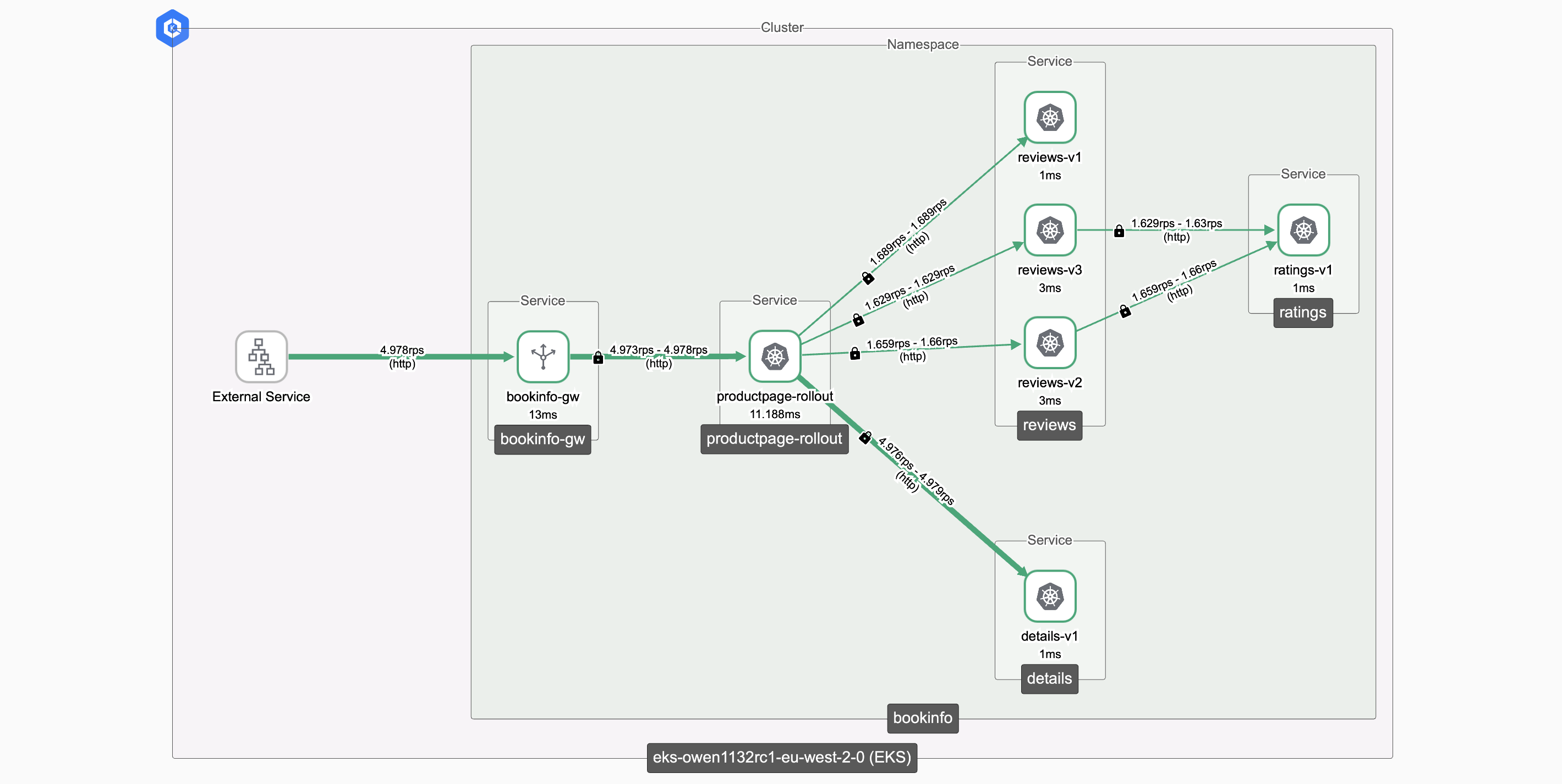
EDITOR=vi tctl edit organizations/tetrate/tenants/default/workspaces/bookinfo-ws/gatewaygroups/bookinfo-gwgroup/unifiedgateways/bookinfo-gatewayVerify that you can still access the application (using the productpage-rollout service) through the gateway:
 Observability delay
The topology charts are rendered from collected usage data over a user-defined sample window, such as 15 minutes. It may take a minute for the most recent productpage-rollout usage data to propagate, and a period of time for the older productpage usage data to leave the sample window.
You can optionally disable bookinfo's instance of the
productpageservice, as it is no longer needed:kubectl delete deployment productpage-v1 -n bookinfo
kubectl delete svc -n bookinfo productpage
Trigger the Rollout
Once the Argo Rollout is triggered, the Argo controller will manage the named mesh VirtualService, adjusting the weights within. The Tetrate XCP service will watch the named mesh VirtualService and synchronise any weight changes with all related gateway VirtualServices.
Check the initial Rollout status
Check the status as follows:
kubectl argo rollouts get rollout -n bookinfo productpage-rollout
Name:            productpage-rollout
Namespace:       bookinfo
Status:          ✔ Healthy
Strategy:        Canary
  Step:          2/2
  SetWeight:     100
  ActualWeight:  100
Images:          docker.io/istio/examples-bookinfo-productpage-v1:1.20.2 (stable)
Replicas:
  Desired:       1
  Current:       1
  Updated:       1
  Ready:         1
  Available:     1

NAME                                            KIND        STATUS     AGE    INFO
⟳ productpage-rollout                           Rollout     ✔ Healthy  6m55s
└──# revision:1
   └──⧉ productpage-rollout-84d547c4b           ReplicaSet  ✔ Healthy  6m54s  stable
      └──□ productpage-rollout-84d547c4b-2njml  Pod         ✔ Running  6m54s  ready:2/2
Trigger the Rollout
Trigger the rollout by updating the image
kubectl argo rollouts set image -n bookinfo productpage-rollout productpage=docker.io/istio/examples-bookinfo-productpage-v1:1.20.3Observe the Rollout
kubectl argo rollouts get rollout -n bookinfo productpage-rolloutName: productpage-rollout
Namespace: bookinfo
Status: ॥ Paused
Message: CanaryPauseStep
Strategy: Canary
Step: 1/2
SetWeight: 10
ActualWeight: 10
Images: docker.io/istio/examples-bookinfo-productpage-v1:1.20.2 (stable)
docker.io/istio/examples-bookinfo-productpage-v1:1.20.3 (canary)
Replicas:
Desired: 1
Current: 2
Updated: 1
Ready: 2
Available: 2
NAME KIND STATUS AGE INFO
⟳ productpage-rollout Rollout ॥ Paused 7m41s
├──# revision:2
│ └──⧉ productpage-rollout-5d898cf89c ReplicaSet ✔ Healthy 15s canary
│ └──□ productpage-rollout-5d898cf89c-w848b Pod ✔ Running 15s ready:2/2
└──# revision:1
└──⧉ productpage-rollout-84d547c4b ReplicaSet ✔ Healthy 7m40s stable
└──□ productpage-rollout-84d547c4b-2njml Pod ✔ Running 7m40s ready:2/2Promote the Rollout
Finally, promote the rollout to production:
kubectl argo rollouts promote -n bookinfo productpage-rolloutCheck the status:
kubectl argo rollouts get rollout -n bookinfo productpage-rolloutName: productpage-rollout
Namespace: bookinfo
Status: ✔ Healthy
Strategy: Canary
Step: 2/2
SetWeight: 100
ActualWeight: 100
Images: docker.io/istio/examples-bookinfo-productpage-v1:1.20.2
docker.io/istio/examples-bookinfo-productpage-v1:1.20.3 (stable)
Replicas:
Desired: 1
Current: 2
Updated: 1
Ready: 2
Available: 2
NAME KIND STATUS AGE INFO
⟳ productpage-rollout Rollout ✔ Healthy 8m45s
├──# revision:2
│ └──⧉ productpage-rollout-5d898cf89c ReplicaSet ✔ Healthy 79s stable
│ └──□ productpage-rollout-5d898cf89c-w848b Pod ✔ Running 79s ready:2/2
└──# revision:1
└──⧉ productpage-rollout-84d547c4b ReplicaSet ✔ Healthy 8m44s delay:8s
└──□ productpage-rollout-84d547c4b-2njml Pod ✔ Running 8m44s ready:2/2
Summary
The TSB integration works smoothly with Argo Rollouts. TSB monitors the activity of Argo Rollouts and ensures that additional TSB configuration is maintained in sync with the rollout state.