 Tetrate Service BridgeVersion: 1.14.x
Onboard Each New Application
Use this runbook each time an App Owner team brings a new application to the platform.
This runbook is the starting point for each application. It links to the pages that explain each resource, and to the optional sections that an application may need. It assumes the following:
- The Platform Owner has already completed the one-time setup in Set Up the Platform: TSB is deployed, strict security is enabled, GitOps is enabled on each workload cluster, and any additional integrations are in place
- The application runs in one namespace, using the same namespace name on each cluster, and has one Workspace. If it uses more namespaces, add them to the namespaceSelector and repeat the per-namespace steps
- The namespace uses sidecar injection with the
defaultrevision. For other revisions or ambient mode, change the namespace label - The application uses its own Ingress Gateway on each cluster
The Platform Owner ("Platform") and Application Owner ("Apps") work through the following steps:
- The App Owner provides the details of the application.
- The Platform Owner checks the request, and identifies anything that needs additional work.
- The Platform Owner creates the namespaces, Workspace, Gateway Groups and Ingress Gateways, and then gives the App Owner the details they need.
- The App Owner deploys the application, provides a TLS certificate and publishes the service.
- Both teams check that the application works, and that the configuration has been accepted.
- If necessary, Tier-1 load balancing is configured for the application
- Both teams agree that the application is ready, using a shared definition of done.
RunBook
App Owner: Request Onboarding
Provide the following details to the Platform Owner. Many teams turn this list into a request template, for example in a ticketing system or a Git repository.
In this example, we'll onboard an application with the following intended topology:
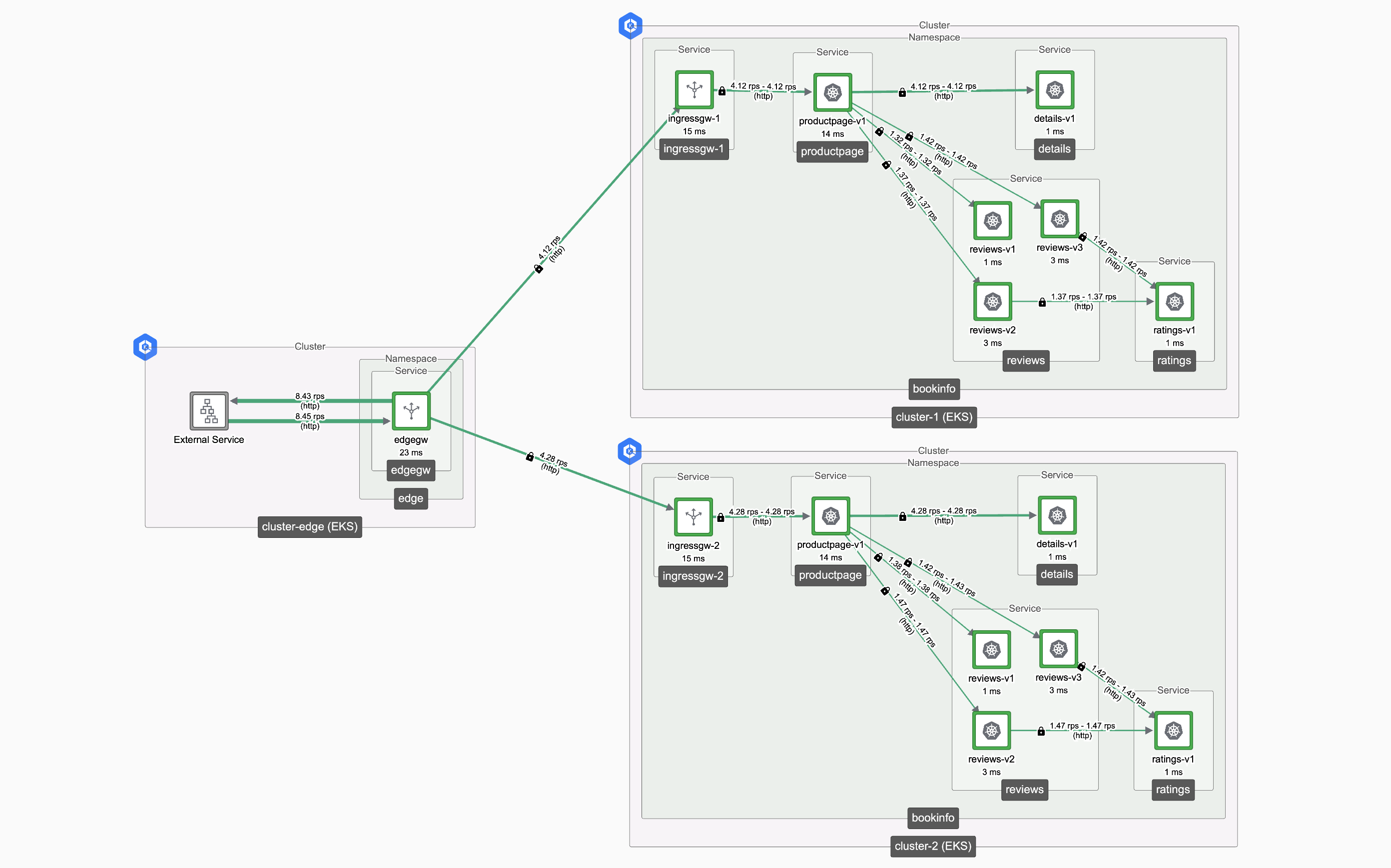 Example Application
Collect the following information:
Item Example Why it's needed Application name bookinfo Used to name the Tetrate resources Owning team and contact App Owner team Identifies who to contact about security requests and incidents Namespace bookinfo Created on each cluster Clusters eks-myorg-eu-west-2-0, eks-myorg-eu-west-1-1 Determines where to create the namespaces External hostnames bookinfo.example.com Determines the DNS and TLS certificate requirements when the application is exposed Services to expose productpage on port 9080 What application services should be exposed; used in the Gateway resource Internal clients Other mesh-hosted services call productpage Requires security rules, because traffic between Workspaces is denied by default (optional) Outbound dependencies Application components that 'call out' from the application Traffic to services in other Workspaces requires security rules. External dependencies may require an egress design Availability needs Fail over to another region Determines whether the application needs cross-cluster or high availability configuration Gateway security needs JWT authentication, rate limits Determines whether the application needs the additional security measures, some of which have platform prerequisites Platform: Review the Request
Review the request before you create any resources. In particular, check the following:
- Names: The namespace and hostnames do not conflict with another application, and the hostnames belong to a domain that the team is permitted to use
- Cross-Workspace flows: Each inbound and outbound flow is justified, and you know who owns the target service. Plan the security rules now, so that the application does not fail when it's first deployed
- Multi-cluster needs: The target clusters have the required East-West Gateways and are in suitable regions
- Platform prerequisites: Any services that the request relies on are enabled, such as the rate limit server
Platform: Create the Application's Resources
For an explanation of each resource, see How Workspaces Work and How Gateways Work.
Set the values for the application. Configure the cluster names and kubectl contexts correctly, and run tctl as a user who can create Workspaces.
export APP=bookinfo
export NS=bookinfo
export ORG=tetrate
export TEN=tetrate
export CLUSTERS="eks-myorg-eu-west-2-0 eks-myorg-eu-west-1-1"
Create the Workspace and its settings, which permit traffic within the Workspace and require mTLS:
cat <<EOF > ${APP}-ws.yaml
apiVersion: api.tsb.tetrate.io/v2
kind: Workspace
metadata:
  organization: ${ORG}
  tenant: ${TEN}
  name: ${APP}-ws
spec:
  namespaceSelector:
    names:
EOF

for CLUSTER in ${CLUSTERS} ; do
  cat <<EOF >> ${APP}-ws.yaml
      - "${CLUSTER}/${NS}"
EOF
done

cat <<EOF >> ${APP}-ws.yaml
---
apiVersion: api.tsb.tetrate.io/v2
kind: WorkspaceSetting
metadata:
  organization: ${ORG}
  tenant: ${TEN}
  workspace: ${APP}-ws
  name: ${APP}-ws-settings
spec:
  defaultSecuritySetting:
    authenticationSettings:
      trafficMode: REQUIRED
    authorization:
      mode: WORKSPACE
EOF

tctl apply -f ${APP}-ws.yaml
The workspace will sit in an IGNORED state in the Tetrate platform until the corresponding namespaces are createdThen, for each cluster, create the namespace, the Gateway Group and the Ingress Gateway, and grant GitOps access to the Workspace:
context_for() {
  case "$1" in
    eks-myorg-eu-west-1-1)   echo "arn:aws:eks:eu-west-1:myaccountid:cluster/eks-myorg-eu-west-1-1" ;;
    eks-myorg-eu-west-2-0)   echo "arn:aws:eks:eu-west-2:myaccountid:cluster/eks-myorg-eu-west-2-0" ;;
  esac
}

for CLUSTER in ${CLUSTERS}; do
  CONTEXT=$(context_for "$CLUSTER")

  kubectl --context ${CONTEXT} create namespace ${NS}
  kubectl --context ${CONTEXT} label namespace ${NS} istio-injection=enabled

  cat <<EOF > ${APP}-gwgroup-${CLUSTER}.yaml
apiVersion: gateway.tsb.tetrate.io/v2
kind: Group
metadata:
  organization: ${ORG}
  tenant: ${TEN}
  workspace: ${APP}-ws
  name: ${APP}-gwgroup-${CLUSTER}
spec:
  namespaceSelector:
    names:
      - "${CLUSTER}/${NS}"
EOF
  tctl apply -f ${APP}-gwgroup-${CLUSTER}.yaml

  cat <<EOF > ${APP}-ingress-gw.yaml
apiVersion: install.tetrate.io/v1alpha1
kind: Gateway
metadata:
  name: ${APP}-ingress-gw
  namespace: ${NS}
spec:
  kubeSpec:
    service:
      type: LoadBalancer
      annotations:
        service.beta.kubernetes.io/aws-load-balancer-scheme: internet-facing
EOF
  kubectl --context ${CONTEXT} apply -f ${APP}-ingress-gw.yaml

  tctl x gitops grant ${CLUSTER} --tenant ${TEN} --workspace ${APP}-ws
done
Once the namespaces are created, the Tetrate platform configuration will be accepted and appliedFor production applications, also make sure that the App Owner team's Kubernetes RBAC allows them to create Gateway resources in the namespace, and review the GitOps caution about which Workspaces a resource can target.
Give the App Owner their Details
Send the following to the App Owner team:
Detail Example Organization and Tenant tetrate, tetrate Workspace bookinfo-ws Gateway Group on each cluster bookinfo-gwgroup-eks-myorg-eu-west-2-0, bookinfo-gwgroup-eks-myorg-eu-west-1-1 Ingress Gateway bookinfo-ingress-gw, in the bookinfo namespace DNS Who creates the records, and how to obtain the public address of the Ingress Gateway TLS certificates Where to obtain the certificate, for example from cert-manager or a corporate CA Metrics How to access the application's metrics Support How to request security rules, and how to get help Apps: Deploy and Publish the Application
Set the values that your Platform Owner provided, and the details of your service:
export APP=bookinfo
export NS=bookinfo
export ORG=tetrate
export TEN=tetrate
export HOST=bookinfo.example.com
export SERVICE=productpage
export SERVICE_PORT=9080
export CLUSTERS="eks-myorg-eu-west-2-0 eks-myorg-eu-west-1-1"
Repeat the following steps for each cluster.
Deploy your application into the namespace, using your usual tooling. Then check that the workloads have joined the mesh, using the namespace label described in Namespaces.
Bookinfo ApplicationWhen testing this runbook, we used the Bookinfo application as follows:
kubectl apply -n ${NS} -f https://raw.githubusercontent.com/istio/istio/master/samples/bookinfo/platform/kube/bookinfo.yamlCreate a Kubernetes tls secret in the namespace, with a certificate that matches your hostname.
Creating TLS secretsIn a non-production environment, you can use openSSL to create the certificate and key:
openssl req -x509 -nodes -days 365 -newkey rsa:2048 -keyout ${NS}.key -out ${NS}.crt \
    -addext "subjectAltName = DNS:${HOST}" -subj "/C=US/O=MyOrg/OU=Test for ${HOST}"
In a production environment, use a tool such as cert-manager to issue and renew the certificate.
Apply the secret:
kubectl create -n ${NS} secret tls ${APP}-cert --key ${NS}.key --cert ${NS}.crtPublish the service. For an explanation of each field, see The Gateway Resource. This Gateway resource serves your application on port 443 using TLS, and redirects HTTP requests on port 80 to HTTPS:
cat <<EOF > ${APP}-gateway-${CLUSTER}.yaml
apiVersion: gateway.tsb.tetrate.io/v2
kind: Gateway
metadata:
  name: ${APP}-gateway
  namespace: ${NS}
  annotations:
    tsb.tetrate.io/organization: ${ORG}
    tsb.tetrate.io/tenant: ${TEN}
    tsb.tetrate.io/workspace: ${APP}-ws
    tsb.tetrate.io/gatewayGroup: ${APP}-gwgroup-${CLUSTER}
spec:
  workloadSelector:
    namespace: ${NS}
    labels:
      app: ${APP}-ingress-gw
  http:
    - name: ${APP}
      port: 80
      hostname: ${HOST}
      routing:
        rules:
          - redirect:
              authority: ${HOST}
              port: 443
              redirectCode: 301
              scheme: https
    - name: ${APP}-tls
      port: 443
      hostname: ${HOST}
      tls:
        mode: SIMPLE
        secretName: ${APP}-cert
      routing:
        rules:
          - route:
              serviceDestination:
                host: ${NS}/${SERVICE}.${NS}.svc.cluster.local
                port: ${SERVICE_PORT}
EOF

kubectl apply -f ${APP}-gateway-${CLUSTER}.yaml
Check for success:
kubectl get -n ${NS} gateway.gateway.tsb.tetrate.io/${APP}-gatewayOnce the configuration is accepted (which can take up to 10 minutes, the default value of
reconcileInterval), you should see confirmation:kubectl get -n ${NS} gateway.gateway.tsb.tetrate.io/${APP}-gatewayNAME GATEWAY-GROUP WORKSPACE TENANT SYNC STATUS AGE
bookinfo-gateway bookinfo-gwgroup-eks-myorg-eu-west-2-0 bookinfo-ws tetrate TSBApplySuccess 8mIf the request is rejected, check the Tetrate parameters against the details that your Platform Owner provided.
Repeat this process for the other cluster(s) where you deploy your application.
Keep these resources in the same Git repository or Helm chart as your application, so that your deployment pipeline can apply them together.
Apps and Platform: Verify the Application
Apps: Check your Deployment
Check that the Tetrate platform has accepted your Gateway resource:
kubectl get gateways.gateway.tsb.tetrate.io -n ${NS} ${APP}-gateway \
    -o jsonpath='{range .status.conditions[*]}{.type}={.status} {.reason}{"\n"}{end}'
The Ready condition should be True, with the reason TSBApplySuccess. Other reasons include:
Reason Meaning What to do TSBApplyRetryPending (from TSB 1.14.3) The resource depends on something that is not ready yet. The platform retries for up to 90 seconds Wait, and check again TSBApplyNonRetriableError The Management Plane rejected the resource Read the condition's message, correct the resource and apply it again Send a request through the Ingress Gateway on each cluster, before you change any DNS records:
export GATEWAY_IP=$(kubectl -n ${NS} get service ${APP}-ingress-gw \
    -o jsonpath="{.status.loadBalancer.ingress[0]['hostname','ip']}")

curl -s -k --connect-to ${HOST}:443:${GATEWAY_IP} "https://${HOST}/"
The
-koption is not required if your certificate is trusted by the client. Change the path if your application does not serve/.Platform: Check the Configuration
Check the status of the application's resources:
tctl status organizations/${ORG}/tenants/${TEN} --fqdn ${HOST}Each resource should report READY. For the meaning of each status, refer to Configuration Status.
On each cluster, check that the Ingress Gateway has loaded a valid certificate, which matches the hostname in the Gateway resource:
tctl x verify gateway-certs -n ${NS}If the application does not respond as expected, follow the Ingress Gateway troubleshooting guide. For access control problems, see Identify Security Blocks.
Platform: Tier-1 Configuration
This workflow deploys and secures an application across two clusters.
If there is a front-end 'Tier-1' gateway, the platform team will need to update the gateway rules to accept traffic for the application and forward it to the gateways on the two clusters.
This is achieved with a configuration resembling the following:
spec:
  workloadSelector:
    namespace: edge
    labels:
      app: edgegw
  http:
    - name: bookinfo
      port: 443
      hostname: bookinfo.example.com
      tls:
        mode: SIMPLE
        secretName: app-cert
      routing:
        rules:
          - route:
              clusterDestination: {}
The Tetrate platform will automatically locate the Tier-2 gateways with matching hostnames and will forward traffic to these.
For more details, refer to the Tier1 - Tier2 Gateway Configuration.
Apps and Platform: Complete Onboarding
An application is onboarded when both teams can confirm each of the following:
- The workloads are running in the mesh on each intended cluster
- The Gateway resource on each cluster reports TSBApplySuccess, and
tctl statusreports READY - The application responds over HTTPS through the Ingress Gateway on each cluster, and HTTP requests are redirected
- Where necessary, Tier-1 load balancing is configured and operates correctly
- DNS resolves the hostname to the correct entry point
- The TLS certificate is valid and matches the hostname, and someone is responsible for renewing it
- Required cross-Workspace flows work, and other flows are denied
- The App Owner can view the application's metrics
- Any multi-cluster, failover or gateway security requirements are configured and tested
- The application's Tetrate resources are stored in Git with the application
- The team knows how to request security rules and get support

What's Next
Depending on the request, continue with the following sections:
- Secure and connect: Extend Security Rules for cross-Workspace flows, and Configure Additional Security Measures for a Service for authentication, authorization and rate limits
- Go multi-cluster: Manage Traffic between Clusters and Achieve High Availability across Clusters
- Operate: Monitor Tetrate Metrics