 Tetrate Service BridgeVersion: next
Explainer: How Workspaces Work
For background, this page explains the relationship between Kubernetes namespaces and Tetrate Workspaces, and how to create a Workspace for an application.
Namespaces
Kubernetes' core unit of isolation is the namespace. Many deployments use very fine-grained namespaces in order to enforce a high level of control and to provide freedom for repeated configuration per service.
Once a workload cluster has been onboarded to TSB, you can create the namespaces that each App Owner team will need, and label them so that they join the mesh. The following example uses sidecar injection with the default revision:
kubectl create namespace bookinfo
kubectl label namespace bookinfo istio-injection=enabled
The label depends on how the cluster is configured:
- Other revisions: If you use Isolation Boundaries with a revision other than
default, label the namespace withistio.io/rev=<revision-name>and do not setistio-injection. - Ambient mode: Label the namespace with
istio.io/dataplane-mode=ambient, as described in Enable Ambient Mode.
Workspaces
In practice, fine-grained namespaces do not accurately model the Application and Team structure that many enterprises follow. Applications are made up of multiple namespaces, often spanning multiple different clusters, zones, regions or even clouds. Teams are responsible for multiple applications, and some applications operate as 'shared services'.
For this reason, Tetrate introduces a higher-level construct called a Workspace. A workspace is the primary unit of isolation in Tetrate products and is simply a set of namespaces, in one or more clusters.
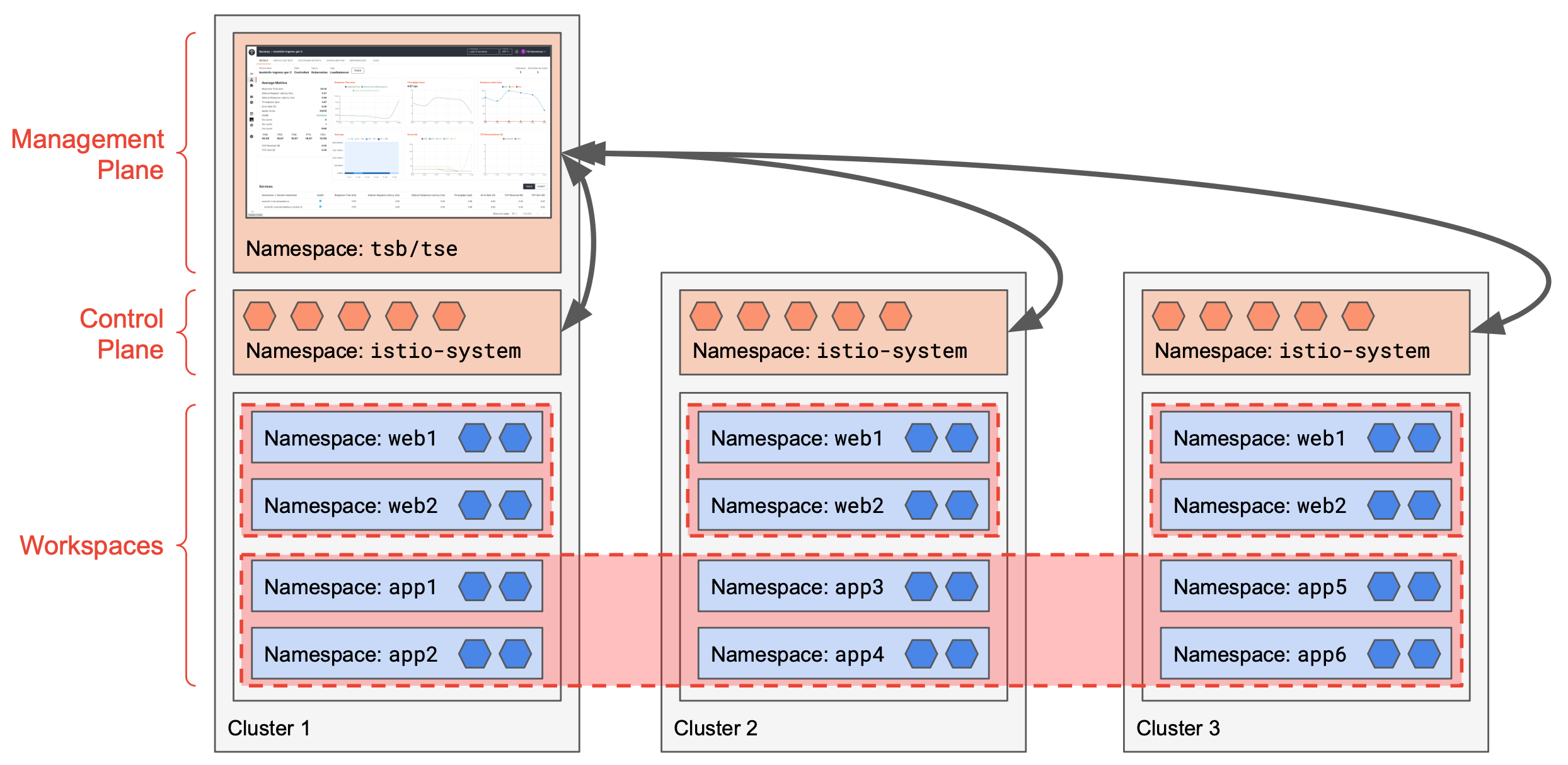 Namespaces and Workspaces |
|---|
Workspaces provide a convenient higher-level abstraction that align with an organization’s applications, which typically span multiple namespaces and/or clusters.
TSB Tenants
Tetrate Service Bridge provides an intermediate Tenant concept that allows for multiple separate teams within the top-level organization. The Tenant can apply an additional level of isolation and can override global settings on a per-team basis.
In this document, we'll assume a single team within the organization, so all settings will be applied at a Workspace level. Examples will use an organization named tetrate and a tenant named tetrate; you should change these to reflect your selected hierarchy.
Create a Tetrate Workspace for each Application, spanning the namespaces assigned to that app:
- A list of namespaces is defined by the Workspace namespaceSelector. Entries can be limited to a single cluster
cluster-1/bookinfoor can span all clusters*/bookinfo - Note how we override the defaultSecuritySetting for each workspace using a WorkspaceSetting
cat <<EOF > bookinfo-ws.yaml
apiVersion: api.tsb.tetrate.io/v2
kind: Workspace
metadata:
  organization: tetrate
  tenant: tetrate
  name: bookinfo-ws
spec:
  namespaceSelector:
    names:
      - "*/bookinfo"
---
apiVersion: api.tsb.tetrate.io/v2
kind: WorkspaceSetting
metadata:
  organization: tetrate
  tenant: tetrate
  workspace: bookinfo-ws
  name: bookinfo-ws-settings
spec:
  defaultSecuritySetting:
    authenticationSettings:
      trafficMode: REQUIRED
    authorization:
      mode: WORKSPACE
EOF

tctl apply -f bookinfo-ws.yaml
By opening up a Workspace (authorization.mode: WORKSPACE), you create a 'bubble' in the Zero-Trust environment. All services within that workspace can communicate with each other, but must use mTLS. Traffic to and from other Workspaces is still denied, until you extend the security rules.