 Tetrate Service BridgeVersion: next
Host Based Access Control For External Services via Egress Gateway
Starting from version 1.9, Unified Gateway has the capability to function as an EgressGateway. This allows clients within the mesh to connect with external services through the EgressGateway.
Users have the flexibility to apply authorization restrictions, specifying which TSB resource ( i.e Tenant, Workspace, Group ) or Service Accounts are permitted to communicate with particular external services, supporting both HTTP and TCP external endpoints or hostnames.
External services are integrated into the mesh via Istio's service entry object and are made accessible to the gateway workload namespace, facilitating communication between the gateway and external services. Mesh clients utilize the egress gateway as an intermediary to reach external services.
By default, access to external services exposed on the EgressGateway is restricted for all mesh clients, necessitating users to configure explicit egress authorization for traffic to be allowed. Sidecars communicate securely with the EgressGateway through Istio mTLS, while communication from the EgressGateway to external services may occur over plaintext or HTTPS.
What is the use-case?
Consider a scenario in which an application cluster is shared by two teams, namely payment and marketing teams. Each team deploys applications within their own namespace, necessitating access to third-party applications or API endpoints through the EgressGateway.
As a Platform Engineer who is granting access, you are responsible for configuring access restrictions based on the external host names that applications deployed by each team attempt to access.
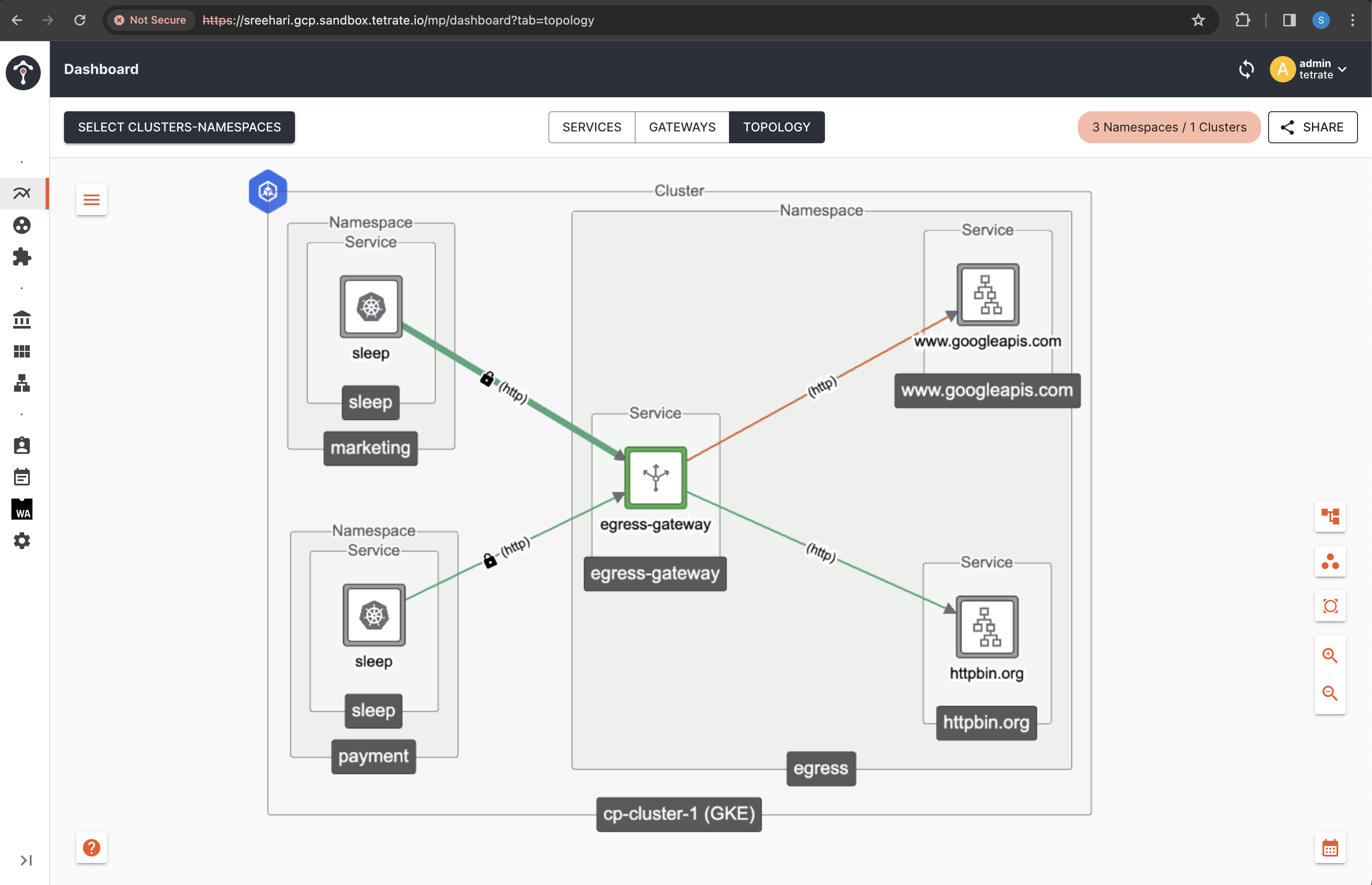
Before you get started, make sure:
✓ TSB is up and running, and GitOps has been enabled for the target cluster
✓ Familiarize yourself with TSB concepts
✓ Completed TSB usage quickstart. This document assumes you are familiar with Tenant Workspace and Config Groups.
Deploy Sleep Services
In this example you will use two sleep services, each residing in separate namespaces.
Create the namespaces payment and marketing and enable istio-injection:enabled on both the namespaces:
kubectl create namespace payment
kubectl label namespace payment istio-injection=enabled --overwrite=true
kubectl apply -f https://docs.tetrate.io/examples/flagger/bookinfo.yaml -n payment

kubectl create namespace marketing
kubectl label namespace marketing istio-injection=enabled --overwrite=true
kubectl apply -f https://docs.tetrate.io/examples/flagger/bookinfo.yaml -n marketing
Create Tenant & Workspace for Sleep Services
You will be creating 2 separate tenants i.e payment and marketing and the workspaces associated with it.
For Tenant - Marketing
Create a file name marketing-workspace.yaml with the following contents. Replace the values for cluster, organization, and tenant accordingly. For demo installations, you can use the value demo for the cluster, and tetrate for both organization and tenant.
apiVersion: tsb.tetrate.io/v2
kind: Tenant
metadata:
  name: marketing
  annotations:
    tsb.tetrate.io/organization: tetrate
spec:
  displayName: Marketing
---
apiVersion: tsb.tetrate.io/v2
kind: Workspace
metadata:
  name: marketing-ws
  annotations:
    tsb.tetrate.io/organization: tetrate
    tsb.tetrate.io/tenant: marketing
spec:
  namespaceSelector:
    names:
      - "cp-cluster-1/marketing"
  displayName: marketing-ws
Apply using kubectl:
kubectl apply -f marketing-workspace.yaml.yaml
For Tenant - Payment
Create a file name payment-workspace.yaml with the following contents. Replace the values for cluster, organization, and tenant accordingly.
apiVersion: tsb.tetrate.io/v2
kind: Tenant
metadata:
  name: payment
  annotations:
    tsb.tetrate.io/organization: tetrate
spec:
  displayName: Payment
---
apiVersion: tsb.tetrate.io/v2
kind: Workspace
metadata:
  name: payment-ws
  annotations:
    tsb.tetrate.io/organization: tetrate
    tsb.tetrate.io/tenant: payment
spec:
  namespaceSelector:
    names:
      - "cp-cluster-1/payment"
  displayName: payment-ws
Apply using kubectl:
kubectl apply -f payment-workspace.yaml
Deploy Unified Gateway as EgressGateway
Create the Egress Gateway Namespace
Egress gateways are typically managed by platform team than the one developing the app (in this case, the sleep services) to avoid the ownerships being mixed up.
In this example we create a separate namespace egress to manage the Egress Gateway. Execute the following command to create a new namespace:
kubectl create namespace egress
Deploy the Egress Gateway
For EGRESS specific use-case, you can create EgressGateway service and deployment by configuring the type as EGRESS in the install resource.
Create a file called egress-deploy.yaml with the following contents:
apiVersion: install.tetrate.io/v1alpha1
kind: Gateway
metadata:
  name: egress-gateway
  namespace: egress
spec:
  type: EGRESS
Apply using kubectl:
kubectl apply -f egress-deploy.yaml
Create TSB Configurations for Egress Gateway
You will also need to create a Tenant, Workspace and a Gateway Group for the Egress Gateway that you just created.
Create a file named egress-gateway-config.yaml with the following contents. Replace the values for cluster, organization, and tenant accordingly.
  - apiVersion: tsb.tetrate.io/v2
    kind: Tenant
    metadata:
      name: platform
      annotations:
        tsb.tetrate.io/organization: tetrate
    spec:
      displayName: Platform
  - apiVersion: tsb.tetrate.io/v2
    kind: Workspace
    metadata:
      name: egress-ws
      annotations:
        tsb.tetrate.io/organization: tetrate
        tsb.tetrate.io/tenant: platform
    spec:
      displayName: Egress Workspace
      namespaceSelector:
        names:
          - "cp-cluster-1/egress"
  - apiVersion: gateway.tsb.tetrate.io/v2
    kind: Group
    metadata:
      name: egress-gg
      annotations:
        tsb.tetrate.io/organization: tetrate
        tsb.tetrate.io/tenant: platform
        tsb.tetrate.io/workspace: egress-ws
    spec:
      displayName: Egress Gateway Group
      namespaceSelector:
        names:
          - "cp-cluster-1/egress"
Apply using kubectl:
kubectl apply -f egress-gateway-config.yaml -n egress
Register External Service
You will be onboarding 2 external services i.e httpbin.org and www.googleapis.com into TSB and will be exposing it over the Egress Gateway.
To onboard an external service into TSB and register it as part of the mesh, you can define an external service using ServiceEntry resource and can propagate the ServiceEntry into application clusters using IstioInternalGroup.
Create a file named external-service.yaml and add the following content.
  - apiVersion: istiointernal.tsb.tetrate.io/v2
    kind: Group
    metadata:
      name: external-svc-gp
      annotations:
        tsb.tetrate.io/organization: tetrate
        tsb.tetrate.io/tenant: platform
        tsb.tetrate.io/workspace: egress-ws
    spec:
      namespaceSelector:
        names:
          - "cp-cluster-1/egress"
  - apiVersion: networking.istio.io/v1beta1
    kind: ServiceEntry
    metadata:
      name: external-svc-httpbin
      annotations:
        tsb.tetrate.io/organization: tetrate
        tsb.tetrate.io/tenant: platform
        tsb.tetrate.io/workspace: egress-ws
        tsb.tetrate.io/istioInternalGroup: external-svc-gp
      labels:
        istio.io/rev: tsb
    spec:
      hosts:
        - httpbin.org
      exportTo:
        - "."
      location: MESH_EXTERNAL
      ports:
        - number: 443
          name: https
          protocol: HTTPS
      resolution: DNS
  - apiVersion: networking.istio.io/v1beta1
    kind: ServiceEntry
    metadata:
      name: external-svc-google
      annotations:
        tsb.tetrate.io/organization: tetrate
        tsb.tetrate.io/tenant: platform
        tsb.tetrate.io/workspace: egress-ws
        tsb.tetrate.io/istioInternalGroup: external-svc-gp
      labels:
        istio.io/rev: tsb
    spec:
      hosts:
        - www.googleapis.com
      exportTo:
        - "."
      location: MESH_EXTERNAL
      ports:
        - number: 443
          name: https
          protocol: HTTPS
      resolution: DNS
Apply using kubectl:
kubectl apply -f external-service.yaml -n egress
Configure Egress Gateway with EgressAuthorization
Starting from TSB 1.10.0, TSB hierarchical constructs like Tenant/Workspace/Groups can also be configured in from construct along with serviceAccount.
As you can see in the egressAuthorization field below, we have restricted access to external service based on the hostname exposed and the source can either be a TSB resource FQN or Tenant specific application service account which is accessing the external service.
Here the access restrictions are configured as below.
- workspace
payment-wsunder Tenantpaymentcan only accesswww.googleapis.com. - service account
sleepunder Tenantmarketingcan only accesshttpbin.org.
Create a file named egress-config.yaml and add the following content.
  apiVersion: gateway.tsb.tetrate.io/v2
  kind: Gateway
  metadata:
    name: shared-egress-gateway
    annotations:
      tsb.tetrate.io/organization: tetrate
      tsb.tetrate.io/tenant: platform
      tsb.tetrate.io/workspace: egress-ws
      tsb.tetrate.io/gatewayGroup: egress-gg
  spec:
    displayName: Shared Egress Gateway
    workloadSelector:
      namespace: egress
      labels:
        app: egress-gateway
    http:
      - hostname: httpbin.org
        name: httpbin-tetrate
        routing:
          rules:
            - route:
                serviceDestination:
                  host: egress/httpbin.org
                  tls:
                    mode: SIMPLE
                    files:
                      caCertificates: "/etc/ssl/certs/ca-certificates.crt"
      - hostname: www.googleapis.com
        name: googleapi-tetrate
        routing:
          rules:
            - route:
                serviceDestination:
                  host: egress/www.googleapis.com
                  tls:
                    mode: SIMPLE
                    files:
                      caCertificates: "/etc/ssl/certs/ca-certificates.crt"
    egressAuthorization:
      - from:
          serviceAccounts:
            - "cp-cluster-1/marketing/sleep"
        to:
        - host:
            exact: "httpbin.org"
      - from:
          resources:
            - "organizations/tetrate/tenants/payment/workspaces/payment-ws"
        to:
        - host:
            exact: "www.googleapis.com"
Apply using kubectl:
kubectl apply -f egress-config.yaml -n egress
Testing
To test whether the EgressGateway and the access restrictions are working correctly, you will be sending requests from the sleep services deployed on both payment as well as marketing to corresponding external service endpoints.
Verify requests from marketing
From marketing namespace, request to httpbin.org should be allowed but request to www.googleapis.com should be denied
kubectl exec "$(kubectl get pod -n marketing -l app=sleep -o jsonpath='{.items[0].metadata.name}')" -n marketing -c sleep -- curl -s http://httpbin.org/ -v
This request should respond with Success 200 OK
kubectl exec "$(kubectl get pod -n marketing -l app=sleep -o jsonpath='{.items[0].metadata.name}')" -n marketing -c sleep -- curl -s http://www.googleapis.com/ -v
This request should fail with RBAC: access denied< HTTP/1.1 403 Forbidden error
Verify requests from payment
From payment namespace, request to www.googleapis.com should be allowed but request to httpbin.org should be denied
kubectl exec "$(kubectl get pod -n payment -l app=sleep -o jsonpath='{.items[0].metadata.name}')" -n payment -c sleep -- curl -s http://www.googleapis.com/ -v
This request should respond with Success 200 OK
kubectl exec "$(kubectl get pod -n payment -l app=sleep -o jsonpath='{.items[0].metadata.name}')" -n payment -c sleep -- curl -s http://httpbin.org/get -v
This request should fail with RBAC: access denied< HTTP/1.1 403 Forbidden error
Per-Workspace Egress Gateway
When you run a dedicated egress gateway per Workspace, get these two things right:
- Turn on per-Workspace egress isolation. Set
XCP_EGRESS_SE_WORKSPACE_ISOLATION=trueon XCP Edge through theControlPlaneCR. Without it, istiod merges the internalServiceEntrythat XCP generates for a shared host across Workspaces, and a client in one Workspace can load-balance its egress traffic onto another Workspace's gateway. - Keep each Workspace's clients and its egress gateway in separate namespaces. If they share a namespace, the client resolves the
MESH_EXTERNALServiceEntryin that namespace and reaches the external host directly — bypassing the gateway — and the colliding same-host ServiceEntries break isolation. See Keep clients and the egress gateway in separate namespaces.
When you expose an external host through a dedicated egress gateway, XCP Edge also generates an internal (MESH_INTERNAL) ServiceEntry that resolves that host to the egress gateway's endpoints, so that mesh clients route to the gateway instead of connecting to the external host directly.
The way this generated internal ServiceEntry is placed matters when the same external host is exposed by egress gateways in more than one Workspace:
-
Default behavior (
XCP_EGRESS_SE_WORKSPACE_ISOLATION=false): XCP Edge generates a single sharedMESH_INTERNALServiceEntryin thexcp-multiclusternamespace whose endpoints are the union of every Workspace's egress gateways. Because istiod merges same-hostServiceEntryresources within a namespace, a client in one Workspace can end up load-balancing its egress traffic across another Workspace's gateway, breaking per-Workspace egress isolation. -
Isolated behavior (
XCP_EGRESS_SE_WORKSPACE_ISOLATION=true, set on XCP Edge): XCP Edge generates a separateMESH_INTERNALServiceEntryper Workspace. Each one isexportTo-scoped to its own Workspace and placed in a non-gateway namespace of that Workspace (not the egress gateway's own namespace). Generating oneServiceEntryper Workspace — instead of a single merged entry inxcp-multicluster— prevents istiod from merging the same host across Workspaces, so each Workspace's clients only resolve their own egress gateway's endpoints.
Opt in via the ControlPlane CR
To turn on per-Workspace egress isolation, set the XCP_EGRESS_SE_WORKSPACE_ISOLATION environment variable to "true" on XCP Edge. Edit the xcp component in the ControlPlane CR (or the equivalent Helm values) and add the variable through an EdgeXcp overlay:
spec:
  components:
    xcp:
      ...
      kubeSpec:
        overlays:
          - apiVersion: install.xcp.tetrate.io/v1alpha1
            kind: EdgeXcp
            name: edge-xcp
            patches:
              - path: spec.components.edgeServer.kubeSpec.deployment.env[-1]
                value:
                  name: XCP_EGRESS_SE_WORKSPACE_ISOLATION
                  value: "true"
This flag only controls the internal ServiceEntry that XCP generates for the egress gateway. It does not change how the MESH_EXTERNAL ServiceEntry resources that you author are handled — the caveats below apply either way.
Caveats
The following behaviors apply whether or not per-Workspace isolation is enabled, and are important to get right when exposing external services through an egress gateway.
Scope MESH_EXTERNAL ServiceEntries with exportTo
When you register an external host with a MESH_EXTERNAL ServiceEntry (as in Register External Service above), always set exportTo to the local namespace (".") rather than exporting it to all namespaces ("*").
If a MESH_EXTERNAL ServiceEntry is exported everywhere ("*"), it leaks into client Workspaces where the XCP-generated MESH_INTERNAL ServiceEntry for the same host also exists. istiod then sees two same-host ServiceEntry resources for that client, and which one is picked is undefined — the client may resolve the external host directly and bypass the egress gateway entirely.
spec:
  hosts:
    - httpbin.org
  exportTo:
    - "."          # scope to the local namespace; do NOT use "*"
  location: MESH_EXTERNAL
  # ...
Keep clients and the egress gateway in separate namespaces
If a single namespace contains both the client workload and the egress gateway, egress isolation cannot be enforced. The client picks up the MESH_EXTERNAL ServiceEntry that lives in its own namespace and connects to the external host directly, bypassing the egress gateway — regardless of how the internal ServiceEntry is generated. Always deploy clients and egress gateways in separate namespaces.