 Tetrate Service BridgeVersion: next
Automated Certificate Management
TSB supports automated certificate management for TSB components. You can configure TSB to provision a root CA that will be used to issue TSB certificates such as the TLS certificate for the TSB front-envoy, internal certificates for communication between control plane and management plane, and intermediate CA certificates for application clusters used by Istio to issue workload certificates.
TSB's automated certificate management currently has the following limitations:
- Does not support configuring certificate rotation period. This is currently fixed to 90 days for TSB TLS and internal certificates, and 1 year for cluster intermediate CA certificates.
PKI pattern when using automated certificate management is shown below:
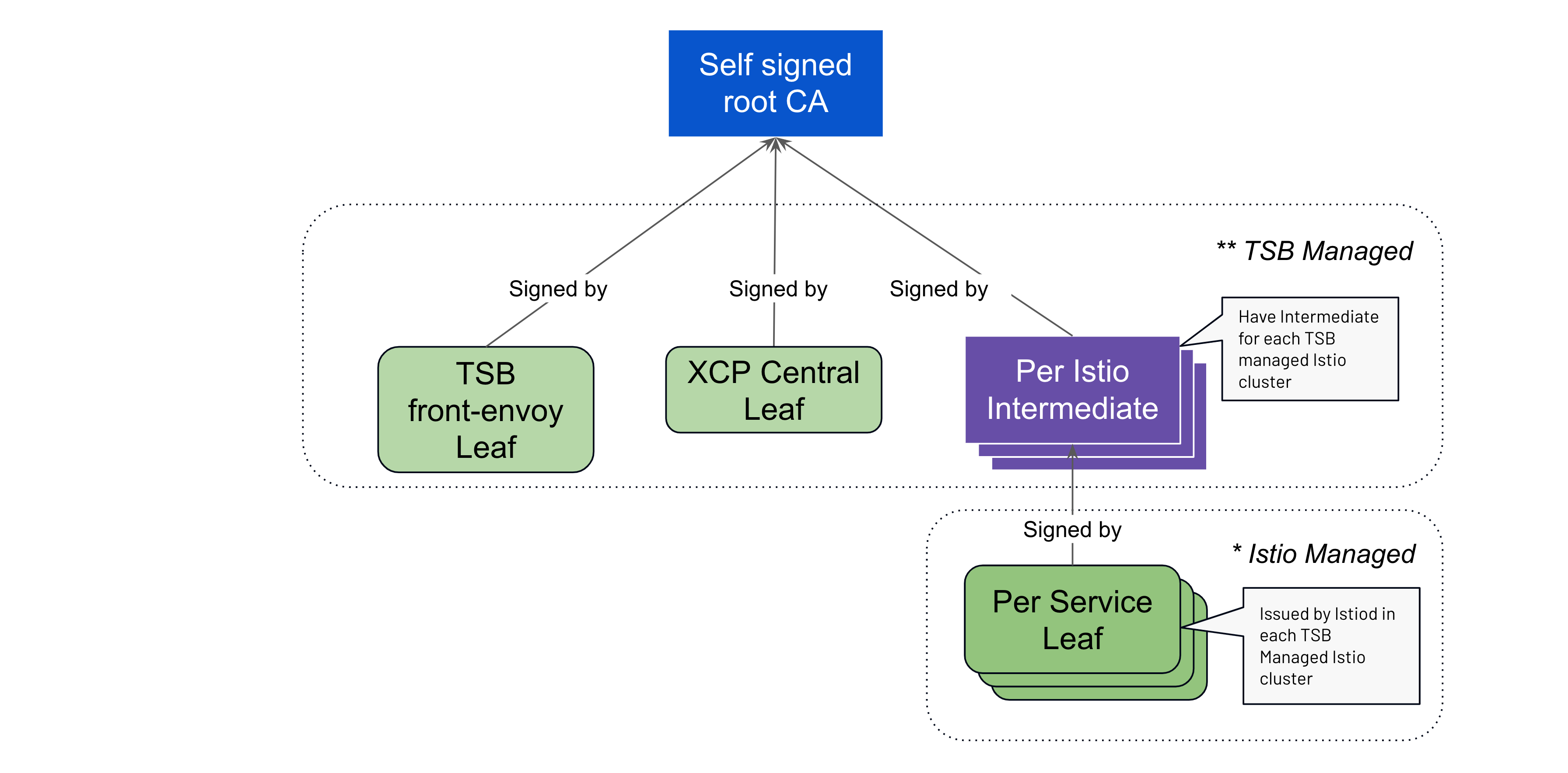
Configuration overview
The certIssuer field in the TSB management plane CR or Helm values controls automated certificate management. It has three sub-fields:
| Field | Purpose |
|---|---|
defaultIssuer | The root CA used for all certificates unless a more specific issuer is configured. |
tsbCerts | When set, TSB will provision a TLS certificate for the TSB API endpoint and internal certificates. Optionally accepts its own issuer to override defaultIssuer. |
clusterIntermediateCAs | When set, TSB will provision an intermediate CA for each cluster. Istio uses these to issue workload certificates. Optionally accepts its own issuer to override defaultIssuer. |
The defaultIssuer (and the per-section issuer overrides) accepts one of three root CA types:
| Type | Description |
|---|---|
selfSigned | TSB creates a self-signed root CA automatically. |
certManagerIssuer | TSB uses an existing cert-manager Issuer or ClusterIssuer you have already configured. |
caSecret | TSB uses a CA stored in an existing Kubernetes kubernetes.io/tls secret in the TSB namespace. |
Enable automated certificate management
Using a self-signed root CA
This is the simplest configuration. TSB creates a self-signed root CA and uses it to issue all certificates:
spec:
  certIssuer:
    defaultIssuer:
      selfSigned: {}
    tsbCerts: {}
    clusterIntermediateCAs: {}
To enable automated cluster intermediate CA certificate management, also set centralProvidedCaCert in spec.components.xcp:
spec:
  components:
    xcp:
      centralProvidedCaCert: true
If you are updating an existing TSB control plane to enable automated certificate management
for intermediate CA certificates, you need to restart istiod so it picks up the new
intermediate CA certificate, then restart Istio workloads (sidecars and gateways) to get
new workload certificates.
Using a custom cert-manager issuer
If you already have cert-manager installed with a configured Issuer or ClusterIssuer,
you can point TSB at it rather than letting TSB create its own self-signed root:
spec:
  certIssuer:
    defaultIssuer:
      certManagerIssuer:
        name: my-cluster-issuer
        kind: ClusterIssuer
    tsbCerts: {}
    clusterIntermediateCAs: {}
Using an existing CA secret
If you have an existing CA stored as a Kubernetes kubernetes.io/tls secret in the TSB
namespace (typically tsb), you can reference it directly:
spec:
  certIssuer:
    defaultIssuer:
      caSecret:
        secretName: my-root-ca
    tsbCerts: {}
    clusterIntermediateCAs: {}
Using different issuers for TSB TLS certificates and cluster intermediate CAs
The tsbCerts and clusterIntermediateCAs sections each accept an optional issuer field
that overrides defaultIssuer for that certificate type. This allows you to sign TSB TLS
certificates and workload intermediate CAs from different root CAs.
For example, to use a custom cert-manager Issuer for TSB TLS certificates and a different
CA secret for cluster intermediate CAs:
spec:
  certIssuer:
    tsbCerts:
      issuer:
        certManagerIssuer:
          name: tsb-certs-issuer
          kind: Issuer
    clusterIntermediateCAs:
      issuer:
        caSecret:
          secretName: cluster-intermediate-ca-root
You can also omit defaultIssuer entirely when each certificate type has its own issuer:
spec:
  certIssuer:
    tsbCerts:
      issuer:
        caSecret:
          secretName: my-rsa-ca
    clusterIntermediateCAs:
      issuer:
        caSecret:
          secretName: my-ec-ca
Using external certificate management
If you want to use external certificate provisioning for any certificate type, omit the
corresponding field from certIssuer to avoid conflicts:
- To use an existing PKI to provision the TSB TLS certificate, remove
tsbCertsfromcertIssuer. Note that if you disable this, you also need to provision TSB internal certificates manually. - To use an existing PKI to provision intermediate CAs, remove
clusterIntermediateCAsfromcertIssuerand setcentralProvidedCaCerttofalsein the TSB control plane CR or Helm values.
If you plan to use external certificate management for both tsbCerts and
clusterIntermediateCAs, you can remove the certIssuer field entirely.
Management plane internal traffic encryption
Traffic between the core management plane services — IAM, TSB (the bridge API server), MPC,
and XCP Central — is encrypted with TLS by default. When enabled, the TSB operator provisions
a dedicated serving certificate for each service, using a shared root CA stored in the secret
tsb-internal-issuer-ca:
| Service | Certificate secret |
|---|---|
TSB (bridge) | tsb-apiserver-cert |
| IAM | tsb-iam-cert |
| MPC | tsb-mpc-cert |
| XCP Central | xcp-central-cert |
Each caller loads the root CA bundle and verifies the peer certificate against it.
Because these certificates are minted from the automated certificate management issuer, no additional configuration is required — they are created and rotated automatically alongside the other TSB certificates.
Encryption and verification are controlled by two environment variables on the management plane operator deployment:
| Variable | Default | Effect |
|---|---|---|
ENCRYPT_INTERNAL_TRAFFIC | true | When set to false, internal management plane traffic reverts to plaintext and the per-service certificates are not created. |
VERIFY_INTERNAL_TRAFFIC | true | When set to false, traffic stays encrypted but callers do not verify the peer certificate against the internal CA. Only takes effect while encryption is enabled. |
Migrating from the deprecated selfSigned field
The top-level certIssuer.selfSigned field is deprecated. If your existing configuration
uses it, migrate to defaultIssuer:
# Before (deprecated)
spec:
  certIssuer:
    selfSigned: {}
    tsbCerts: {}
    clusterIntermediateCAs: {}
# After
spec:
  certIssuer:
    defaultIssuer:
      selfSigned: {}
    tsbCerts: {}
    clusterIntermediateCAs: {}
The deprecated selfSigned field continues to work but will be removed in a future release.