 Tetrate AI Agent AcceleratorsVersion: Latest
Migrate from Ingress-NGINX to Tetrate Enterprise Gateway
With NGINX announcing Ingress-NGINX Retirement and long-term uncertainty around future support, many organizations are actively looking for a migration path that does not introduce operational risk or large refactoring efforts. Teams want a solution that allows them to move forward quickly, safely, and without disrupting existing workloads.
Tetrate Enterprise Gateway (TEG) addresses this need by enabling a low-friction, annotation-preserving migration from NGINX Ingress to a modern, Gateway API–based architecture—without forcing teams to rewrite manifests or change application behavior.
This guide shows how you can migrate from NGINX Ingress to TEG with zero annotation changes, allowing organizations to move away from deprecated ingress controllers while maintaining stability and developer velocity.
Overview
This guide walks you through migrating from NGINX Ingress Controller to Tetrate Enterprise Gateway (TEG). The migration process is designed to be seamless and incremental:
- Existing NGINX Ingress resources continue to work
- No annotation rewrites are required
- Gateway API resources are generated automatically
- Migration can be scoped namespace by namespace
At the core of this experience is the Tetrate Hosted Agent, which watches NGINX Ingress resources and translates them into Gateway API–native resources in real time
What You Get
| Component | Description |
|---|---|
| Tetrate Enterprise Gateway (TEG) | Production-ready Envoy Gateway with enterprise support, FIPS-verified builds, and proactive CVE protection |
| Tetrate Hosted Agent | Automatically translates NGINX annotations to Kubernetes Gateway API resources |
| Gateway API Resources | Modern, standardized Kubernetes resources (Gateway, HTTPRoute, SecurityPolicy) |
Prerequisites
Before you begin, ensure you have:
- Kubernetes cluster (v1.25 or later) with
kubectlaccess - Helm 3.x installed
- Cluster admin permissions to install CRDs and create namespaces
- Existing NGINX Ingress resources (optional—you can start fresh)
Note: The NGINX Ingress Controller does not need to be installed. The Tetrate Hosted Agent reads Ingress resources directly from the Kubernetes API.
Installation
Option A: Full Stack Installation (Recommended)
Install TEG and the Tetrate Hosted Agent together using the onboarding script. This is the fastest way to get started.
Estimated time: 2-3 minutes
curl -sL https://dl.cloudsmith.io/public/tetrate/tetrate-platform-scripts/raw/files/onboard-cluster-teg.sh | \
  bash -s -- --cluster my-cluster --with-agent
This installs:
- Gateway API CRDs
- Envoy Gateway with
tegGatewayClass - Shared Gateway in
tetrate-systemnamespace - Tetrate Hosted Agent configured for NGINX migration
Verify the installation:
# Check TEG components
kubectl get pods -n envoy-gateway-system

# Expected output:
# NAME                              READY   STATUS    RESTARTS   AGE
# envoy-gateway-xxx                 1/1     Running   0          2m
# teg-envoy-xxx                     1/1     Running   0          2m

# Check agent
kubectl get pods -n tetrate-system -l app.kubernetes.io/name=tetrate-hosted-agent

# Expected output:
# NAME                                    READY   STATUS    RESTARTS   AGE
# tetrate-hosted-agent-xxx                1/1     Running   0          2m

# Verify GatewayClass
kubectl get gatewayclass

# Expected output:
# NAME   CONTROLLER                                      ACCEPTED   AGE
# teg    gateway.envoyproxy.io/gatewayclass-controller   True       2m
Option B: Agent-Only Installation
If you already have TEG installed, add only the Tetrate Hosted Agent:
helm repo add tetrate-tsb-helm 'https://charts.dl.tetrate.io/public/helm/charts/'
helm repo update

helm upgrade --install tetrate-hosted-agent tetrate-tsb-helm/tetrate-hosted-agent \
  --namespace tetrate-system \
  --create-namespace \
  --set agent.emitter.tegEnabled=true \
  --set agent.emitter.tsbEnabled=false \
  --set agent.kubernetes.ingressWatcherEnabled=true \
  --set "agent.kubernetes.ingressClasses={nginx,tetrate}"
Note: The
ingressClassesparameter determines which Ingress resources the agent watches. Include bothnginx(for migration) andtetrate(for production use).
Migration Steps
Step 1: Label Your Namespace
The agent only processes Ingresses in namespaces with the trigger label. Add the label to your application namespace:
kubectl label namespace <YOUR_NAMESPACE> tetrate.io/rev=default
Example:
kubectl label namespace httpbin tetrate.io/rev=default
Caution: Without this label, the agent will not process Ingress resources in the namespace. This is a safety mechanism to prevent unintended migrations.
Step 2: Apply or Re-Use Your Existing Ingress
Your existing NGINX annotations remain unchanged. No refactoring is required.
apiVersion: networking.k8s.io/v1
kind: Ingress
metadata:
  name: my-app
  namespace: httpbin
  annotations:
    nginx.ingress.kubernetes.io/limit-rps: "10"
    nginx.ingress.kubernetes.io/enable-cors: "true"
    nginx.ingress.kubernetes.io/cors-allow-origin: "https://example.com"
spec:
  ingressClassName: nginx
  rules:
  - host: app.example.com
    http:
      paths:
      - path: /
        pathType: Prefix
        backend:
          service:
            name: my-app
            port:
              number: 8080
If you are starting fresh to test the migration, you may apply the resource and see how it translates to TEG.
kubectl apply -f my-ingress.yaml
Step 3: Verify Migration
Verify the translated envoy gateway resources.
Verify Gateway resources were created:
# Check Gateway
kubectl get gateway -A

# Expected output:
# NAMESPACE        NAME                   CLASS   ADDRESS          PROGRAMMED   AGE
# httpbin          gw-app-example-com     teg     34.138.x.x       True         30s

# Check HTTPRoute
kubectl get httproute -A

# Expected output:
# NAMESPACE   NAME                              HOSTNAMES             AGE
# httpbin     gw-app-example-com-my-app        ["app.example.com"]    30s

# Check SecurityPolicy (if rate limiting or CORS was configured)
kubectl get securitypolicy -A

# Expected output:
# NAMESPACE   NAME                                    AGE
# httpbin     gw-app-example-com-security             30s
Step 4: Test Your Application
Get the Gateway's external IP:
kubectl get gateway -n httpbin gw-app-example-com -o jsonpath='{.status.addresses[0].value}'
Test connectivity:
curl -H "Host: app.example.com" http://<GATEWAY_IP>/
Examples
Basic HTTP Service
apiVersion: networking.k8s.io/v1
kind: Ingress
metadata:
  name: httpbin-ingress
  namespace: httpbin
  annotations:
    nginx.ingress.kubernetes.io/limit-rps: "10"
    nginx.ingress.kubernetes.io/enable-cors: "true"
    nginx.ingress.kubernetes.io/cors-allow-origin: "https://example.com"
spec:
  ingressClassName: tetrate
  rules:
  - host: api.httpbin.com
    http:
      paths:
      - path: /
        pathType: Prefix
        backend:
          service:
            name: httpbin
            port:
              number: 8000
Rate Limiting with CORS
apiVersion: networking.k8s.io/v1
kind: Ingress
metadata:
  name: api-gateway
  namespace: api
  annotations:
    nginx.ingress.kubernetes.io/limit-rps: "100"
    nginx.ingress.kubernetes.io/enable-cors: "true"
    nginx.ingress.kubernetes.io/cors-allow-origin: "https://app.example.com,https://admin.example.com"
    nginx.ingress.kubernetes.io/cors-allow-methods: "GET,POST,PUT,DELETE"
spec:
  ingressClassName: tetrate
  rules:
  - host: api.example.com
    http:
      paths:
      - path: /
        pathType: Prefix
        backend:
          service:
            name: api-service
            port:
              number: 8080
Canary Deployment (30% Traffic)
Canary Ingress:
apiVersion: networking.k8s.io/v1
kind: Ingress
metadata:
  name: app-canary
  namespace: production
  annotations:
    nginx.ingress.kubernetes.io/canary: "true"
    nginx.ingress.kubernetes.io/canary-weight: "30"
spec:
  ingressClassName: tetrate
  rules:
  - host: app.example.com
    http:
      paths:
      - path: /
        pathType: Prefix
        backend:
          service:
            name: app-v2
            port:
              number: 8080
External Authentication
apiVersion: networking.k8s.io/v1
kind: Ingress
metadata:
  name: protected-app
  namespace: secure
  annotations:
    nginx.ingress.kubernetes.io/auth-url: "https://auth.example.com/validate"
    nginx.ingress.kubernetes.io/auth-response-headers: "X-User-ID,X-User-Email"
spec:
  ingressClassName: tetrate
  rules:
  - host: protected.example.com
    http:
      paths:
      - path: /
        pathType: Prefix
        backend:
          service:
            name: protected-app
            port:
              number: 8080
Troubleshooting
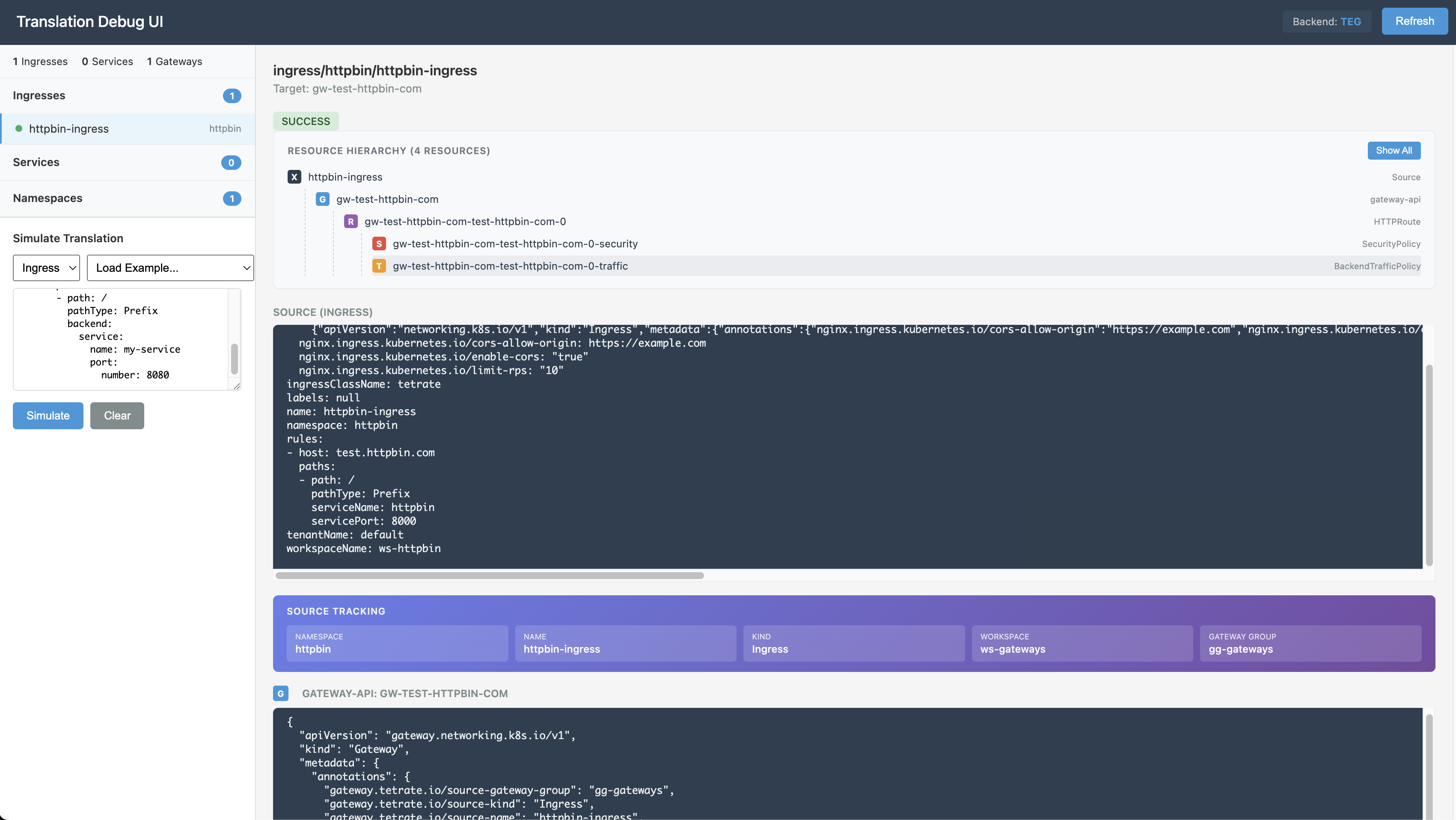
Debug UI
The agent provides a debug UI to inspect translated configurations:
kubectl port-forward -n tetrate-system deployment/tetrate-hosted-agent 8080:8080
Then open: http://localhost:8080/debug/ui
Status Feedback
The agent writes status of the translated resources back to the original Ingress resourecs.
# Check configuration status
kubectl get ingress httpbin-ingress -o jsonpath='{.metadata.annotations.gateway\.tetrate\.io/gateway-status}' -n httpbin
# Example status output                                                                                                                                                                                   │
{
    "phase": "Configured",
    "resources": [
        "Gateway/gw-api-httpbin-com",
        "HTTPRoute/gw-api-httpbin-com-0",
        "SecurityPolicy/gw-api-httpbin-com-0-security",
        "BackendTrafficPolicy/gw-api-httpbin-com-0-traffic"
    ]
}
Check Agent Logs
kubectl logs -n tetrate-system -l app.kubernetes.io/name=tetrate-hosted-agent --tail=100
Healthy logs look like:
{"level":"INFO","msg":"Translated nginx annotations to Tetrate format","ingress":"my-app","translatedCount":3}
{"level":"INFO","msg":"Ingress exposed for gateway","ingress":"my-app","hosts":["app.example.com"]}
Common Issues
| Symptom | Cause | Solution |
|---|---|---|
ingresses_reconciled: 0 in logs | Namespace missing trigger label | Run kubectl label namespace <NS> tetrate.io/rev=default |
| No Gateway created | Wrong IngressClass | Ensure ingressClassName: tetrate in your Ingress |
| "IngressClass not watched" in logs | Agent not configured for your class | Check INGRESS_CLASSES env var includes your class |
| "GatewayClass not found" | TEG not installed | Install TEG or verify TEG_GATEWAY_CLASS matches |
| RBAC errors | Missing permissions | Apply the agent's ClusterRole and ClusterRoleBinding |